python基础

本文大部分来自 崇天版python
不涉及面向对象

介绍

  • python 软件基金会: (Python Software Foudation,PSF)
  • 开源社区:(https://opensource.org)
  • Guido van Rossum 1989年12月开始,1990年诞生

BMI指数

Body Mass Index 身体质量指数
体重(kg)/(身高(m)的平方)
2008年,python3的第一个版本正式发布
2016年3.6版本发布

向后兼容(Backward Compatibility),也称向下兼容

版本 3于2的一些语法区别,可参考Guido的

几个语法点
3.x默认UTF-8编码
print()代替了print语句
用exec()替代了exec语句
去掉<> 用!=表示不等于
int类型无取值范围限制
整数除法(//) ;而(/) 返回浮点数
修改八进制格式,用0o,而不用0开头
用input()代替raw_input()
range()不再返回一个列表,要转换成列表用 list()函数。。

pyinstaller库

对python源程序打包,以在windows,linux,Mac OSX等操作系统下使用。。。
安装:pip install pyinstaller
官网:http://www.pyinstaller.org/

pyinstaller D:\a\aa.py 会生成
dist和build两个文件夹
build:目录放存储临时文件的目录,可删除
dist:打包程序存放在其下dpython文件夹里,目录中其他文件是可执行文件dpython.exe的动态链接库

生成独立可执行文件:
pyinstaller -F b.py

pip工具

1
2
3
4
5
6
7
8
9
10
11
12
13
14
15
16
pip -h    帮助

pip install 库名

pip install -U 库名 更新库


pip uninstall 库名 卸载库

pip list 列出当前已安装库

pip show 库名 列出已安装库的详细信息

pip download 库名 下载但是不安装

pip search 关键字 查询相关库

自定义安装

xxxx.whl

pip install xxxx.whl

语法小说明

  • 单行注释: #
  • 多行注释:三个单引号'''
  • 字符串的使用:

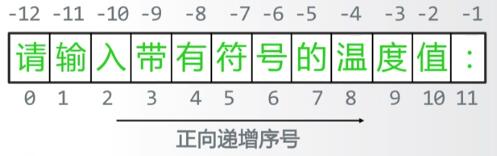
    字符串访问方式:a[:-1] 不包括-1小标,前面可留空

基本数据类型

整数

进制 引导符号
十进制
二进制 0b,0B
八进制 0o,0O
十六进制 0x,0X

浮点

  • 科学计数: ae-3

    import sys
    print(sys.float_info)
    #查看浮点各项参数

  • 高精度浮点运算:使用 Decimal库

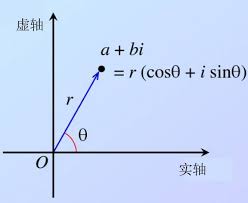
复数类型

1
2
3
4
J或j
实部:z.real
虚部:z.imag

复数的几何表示:

旋转角度而得的一个(a,b)

九个数字类型操作符

+

*
/
//
%
-(x)
+(x)
x**y

宽度:整数《浮点《复数

内置函数

函数 简述
abs(x) x的绝对值
divmod(x,y) 输出(x//y,x%y),二元组
pow(x,y[,z]) (x**y)%z
round(x,[,ndigits]) 对x四舍五入,保留ndigits位小数,round(x)表示返回整数
max(a,b,c,d) 中的最大指
min(x1,x2,x3,x4,x5) 中的最小值

数字类型的相互转换

int(x):x可以是浮点,字符串
float(x):可以是整数或字符串
complex(re[,im]):实数部分为re,虚数部分为im re可以是整数,浮点,字符串 rm 不能为字符串

math库

常用math库函数常数:

math.pi
math.e
math.inf 正无穷大 -math.inf 负无穷大
math.nan NaN not a number

math库几个函数

math.fsum([x,y,…]) 求和

字符串

操作符

x+y
xn 或 nx
x in s 若x是n的子串则返回true 否则返回false
str[i]
str[N:M]

内置字符串处理函数

1
2
3
4
5
6
len(x)   返回字符串的长度,有几个字符就返回几
str(x) 返回任意类型的字符串格式
chr(x) x是对应的Unicode编码,返回单字符
ord(x) x是单字符,返回Unicode编码
hex(x) x是整数,返回十六进制
oct(x) x是整数,返回八进制

内置的字符串处理方法

1
2
3
4
5
6
7
8
9
10
11
12
13
14
15
str.lower()
str.upper()
str.islower()
str.isprintable()
str.isnumeric()
str.isspace()
str.endswith(suffix[,start[,end]])
str.startswith(prefix[,start[,end]])
str.split(sep=None,maxsplit=-1)
str.count(sub[,start[,end]])
str.replace(old,new[,count])
str.center(width[,fillchar])
str.strip([chars])
str.join(iterable)

字符串类型的格式化 format()

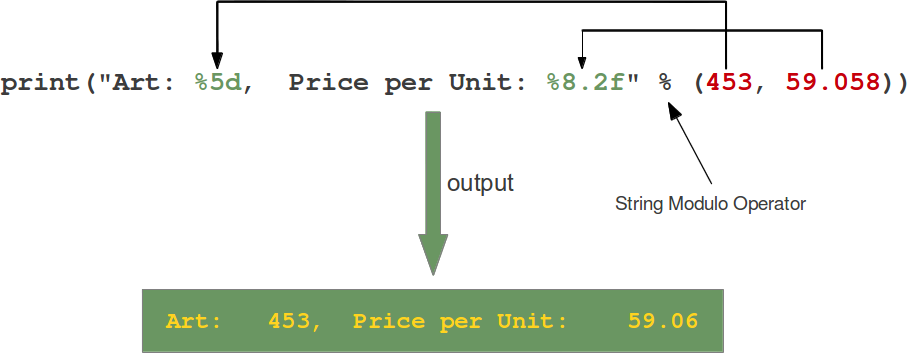
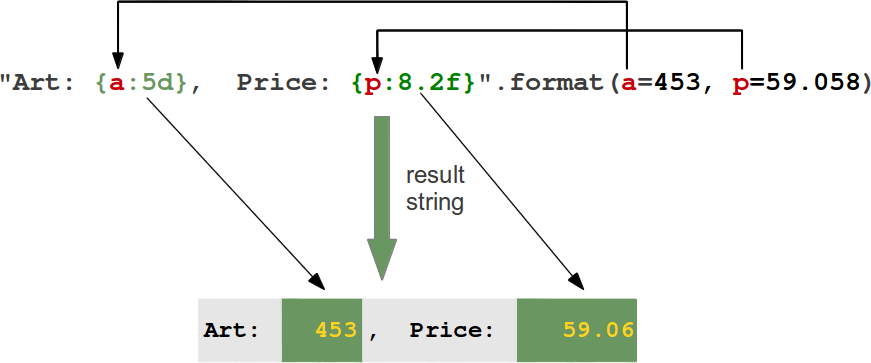
其实输出有两种:
1.%

2.format()

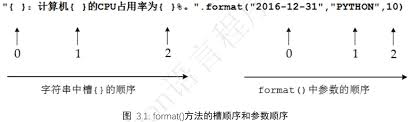
这里主要介绍format()

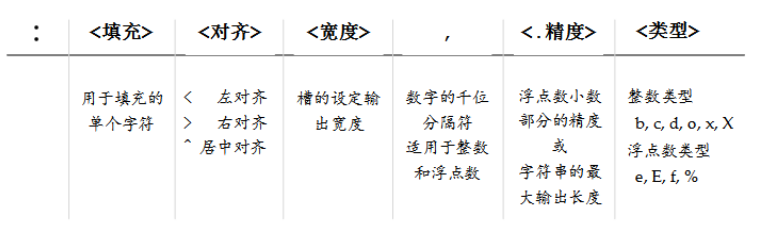
槽的顺序:

槽中相应的字段

介绍一下:<类型>

  • 整数类型
    b:整数的二进制
    c:整数对应的Unicode
    d:十进制
    o: 整数对应的八进制
    x: 小写的十六进制
    X: 大写的十六进制

  • 浮点类型
    e: 指数 科学计算
    E: 大写
    f:标准浮点数
    %:百分形式

字符串和字节流

字节:8个比特组成,以构成字节流
字符串由编码字符的序列组成,根据编码不同,长度也不同
所以,从存储空间来看,字符串和字节流不同。。。

字符值在内存中形成,由字节流经过编码后产生。。
硬盘上所有的文件都是以字节形式存储。。。

赋值

可以:
x,y=10,12 逗号分隔,一一对应即可
x.y=y,x 也不用担心中间变量问题

input()

返回的是字符串,配合eval()函数才能变为相应类型。。

1
2
3
4
5
6
7
8
9
10
11
>>> help(input)
Help on built-in function input in module builtins:

input(prompt=None, /)
Read a string from standard input. The trailing newline is stripped.

The prompt string, if given, is printed to standard output without a
trailing newline before reading input.

If the user hits EOF (*nix: Ctrl-D, Windows: Ctrl-Z+Return), raise EOFError.
On *nix systems, readline is used if available.

eval() 去掉变量的引号

1
2
3
4
5
6
7
8
9
10
11
12
13
>>> help(eval)
Help on built-in function eval in module builtins:

eval(source, globals=None, locals=None, /)
Evaluate the given source in the context of globals and locals.

The source may be a string representing a Python expression
or a code object as returned by compile().
The globals must be a dictionary and locals can be any mapping,
defaulting to the current globals and locals.
If only globals is given, locals defaults to it.


1
2
3
4
5
6
7
8
9
10
11
12
>>> help(print)
Help on built-in function print in module builtins:

print(...)
print(value, ..., sep=' ', end='\n', file=sys.stdout, flush=False)

Prints the values to a stream, or to sys.stdout by default.
Optional keyword arguments:
file: a file-like object (stream); defaults to the current sys.stdout.
sep: string inserted between values, default a space.
end: string appended after the last value, default a newline.
flush: whether to forcibly flush the stream.

print(“”.format()) 函数里面接format格式化字符串。。。
详询格式化字符串的format的使用方法

1
2
3
4
5
6
7
8
9
10
>>> help(format)
>>> help(str.format)
Help on method_descriptor:

format(...)
S.format(*args, **kwargs) -> str

Return a formatted version of S, using substitutions from args and kwargs.
The substitutions are identified by braces ('{' and '}').

程序的控制结构

分支结构

  • if
    if … :

      ....
  • if-else:
    if … :

      ....

    else:

      ...

也可以写在一行里:
<expression1> if <condition> else <expression2>

  • if elif else
    1
    2
    3
    4
    5
    6
    7
    8
    9
    if ... :
    ...
    elif ... :
    ....
    elif ... :
    ...
    ...
    else:
    .....

    循环结构

    for i in xx:

常用:

1
2
3
4
5
6
7
8
for i in range(N):

for line in file:

for char in string:

列表:
for item in list:

有一种配合 else:

1
2
3
4
5
6
for .. in ..:
...
..
else:
...
只在for正常执行并结束后才执行else后的语句。。。

while 无限循环

1
2
3
4
5
6
7
8
9
while <条件>:
....

----------------------
while <条件>:
....
else:
....

break, continue

break:跳出最内层for或while
continue:结束本轮循环

continue 对循环的扩展用法else 没有影响
break ………………………………………..有影响

import

两种引入方式

  • one
    from [库] import a ,b,c,d
    from [库] import * 通配符
  • two
    import [库] 但是这种方式要加库名 turtle.a()

内建函数

1
2
3
4
5
6
7
all()			
any()
hash()
id()
reversed() 逆序
sorted()
type()

函数

定义一个函数

  • def关键字
1
2
3
def <函数名>(<参数列表>):
<函数体>
return <返回值列表>
  • lambda 函数
    1
    2
    3
    4
    5
    6
    <函数名> = lambda <参数列表>:<表达式> 
    #这样只需一行即可

    #等价于:
    def 函数名(参数列表):
    return 表达式

参数的传递

有些参数可选

1
2
3
4
5
#默认值
def fa(str,nu=2):
....
--------------
由于函数调用时是按顺序输入参数,可选参数必须定义在非可选参数后面。。。

可变数量参数

  • 这里指元组 加个* 号
    1
    2
    3
    4
    5
    6
    7
    8
    9
    10
    11
    def v(a,*b):
    print(type(b))
    for n in b:
    a+=n
    return a
    ---------------------
    #调用:
    v(1,2,3,4)

    #在参数前加*号,此参数必须放在参数列表的最后
    #调用时,这些参数会被当作元组类型传递到函数当中。。

参数位置和名称传递

  • 按照形参名称输入,则可换位置
    1
    2
    3
    func(a,b,c)

    nu=func(b=1,c=3,b=46)

    函数可以没有 return

变量的作用域

全局变量,局部变量

  • 首先,函数内的变量是局部变量

  • 函数外的变量是全局变量

  • 要想在函数内使用全局变量,得使用 global a 声明你要引用外面的全局变量,并且改变它的值。。。

函数空间,在内存里单独开辟
函数内可以到函数空间外寻找列表等组合数据类型并引用它,从而修改它们的值
无需使用 global 关键字。。。

而函数内创建的组合类型数据(比如列表)则会在函数执行完而消失,不会保存,是局部变量。。。

python中的引用与创建:组合类型数据

** 比如说列表等组合类型变量**

只有当赋值时使用[],才有列表被真实创建,否则只是对之前创建好的列表的一次引用。。。

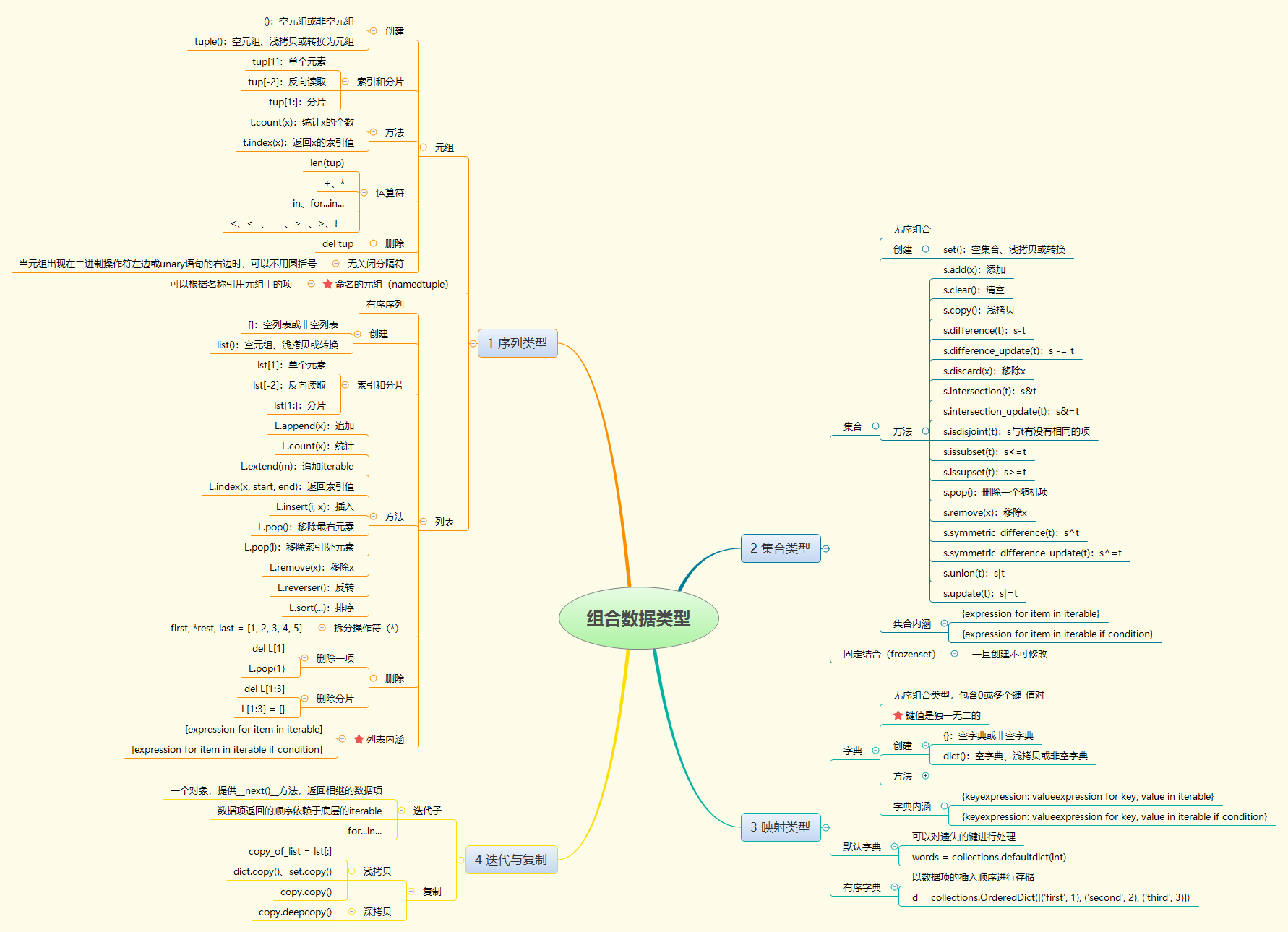
组合数据类型

先看下分类:

序列

常用:成员关系操作符(in),长度计算函数len() ,分片:[]
元组生成后是固定的

  • 只要是序列类型就可以使用索引体系
  • 12个通用操作符和函数:
    1
    2
    3
    4
    5
    6
    7
    8
    9
    10
    11
    12
    x in s
    x not in s
    s+t
    s*n 或 n*s
    s[i]
    s[i:j]
    s[i:j:k] 步长为k
    len(s)
    min(s) 最小元素
    max(s) 最大元素
    s.index(x[,i[,j]]) i到j位置,第一次出现x元素的位置。。
    s.count(x) 出现x的总次数

集合

  • 无序
  • 元素不可重复
  • 只能是固定的数据类型,不能是列表,字典,集合
  • set(x)生成集合 {}

集合类型的操作符

& 交集
| 并集
- 差集
^ 补集

1
2
3
4
5
6
7
8
9
10
11
12
13
14
15
16
17
18
19
S-T或S.difference(T)

S-=T或S.difference_update(T)

S&T或S.intersection(T)

S&=T或S.intersection_update(T)

S^T或S.symmetric_difference(T) 返回一个新集合,包括S和T中的元素,但是不包括同时在内的元素

S^T或S.symmetric_dirrerence_update(T) 更新集合

S|T或S.union(T)

S=|T或S.update(T)

S<=T 或 S.issubset(T)

S>=T或S.issuperset(T)

集合类型的操作函数或方法

1
2
3
4
5
6
7
8
9
10
S.add(x)
S.clear()
S.copy()
S.pop() 随机返回S中的一个元素
S.discard(x) 如果x在S中,移除x,不在的话没关系
S.remove(x)
S.isdisjoint(T) 返回 True False 如果X和T没有相同的元素则True
len(S)
x in S
x not in S

列表

  • 可比较,< ….等,实际是列表元素的逐一比较。。
  • list()

列表跟数组(C)

  1. 数组需要预先分配大小
  2. 数组要求元素类型一致

列表特有的函数或方法

1
2
3
4
5
6
7
8
9
10
11
12
13
14
15
16
17
18
19
20
21
22
23
24
25
26
27
ls[i]=x

ls[i:j]=lt

ls[i:j:k]=lt

del ls[i:j]

del ls[i:j:k]

ls+=lt或ls.extend(lt)

ls*=n

ls.append(x)

ls.clear()

ls.copy()

ls.insert(i,x)

ls.pop(i) 删除i位置元素

ls.remove(x)

ls.reverse(x)

字典

<键>:内容

  • 可以把字典看成集合
  • 键值 : {}
  • 值=变量[键]
    <a>.<b>

    函数或方法

    1
    2
    3
    4
    5
    6
    7
    8
    9
    10
    11
    12
    13
    14
    15
    16
    17
    <dict>.keys()

    <dict>.values()

    <dict>.items() 返回所有的键值对

    <dict>.get(<key>,<default>) 键存在则返回相应值,否则返回默认值

    <dict>.pop(<key>,<default>) 删除

    <dict>.popitem() 取出,并返回元组

    <dict>.clear()

    del <dict>[<key>]

    <key> in <dict>
    往字典加元素:
    <dict>['a']='okok'

索引

按照一定顺序检索内容的体系
两类:数字索引(位置索引);字符索引(单词索引)
字典采用字符索引

python中界定是否是固定类型

是看其是否能进行哈希运算,能的话就是固定类型

哈希运算

将任意长度的二进制值映射为较短的固定长度的二进制值,这个固定长度的二进制值称为哈希值。。
哈希值是对数据的一种有损且紧凑的表示形式。
hash(x)

异常

基本用法

try-except

1
2
3
4
try:
...
except <异常类型>
...

高级用法:

1
2
3
4
5
6
7
8
try:
...
except <exception1>:
...
except <exception2>:
...
except:
...

可加finally 或 else 使用

1
2
3
4
5
6
7
8
try:
...
except <类型1>:
...
else:
...
finally:
...

当try语句后的没有异常,则执行else语句,
而finally后的语句则不管出不出异常都会执行。。。
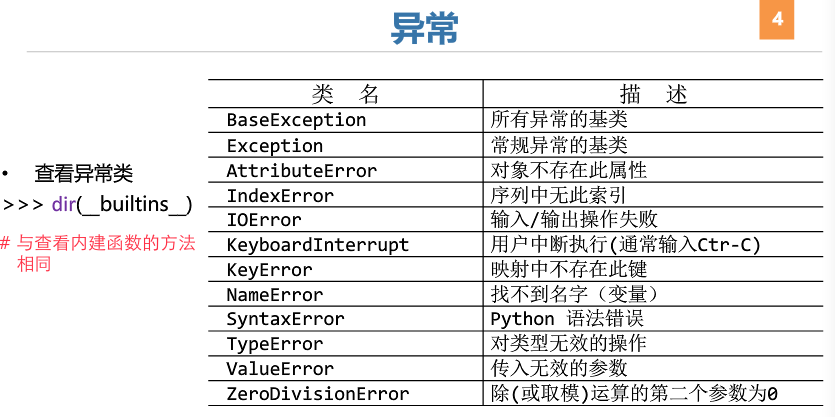
常见异常类型:

例子

  • 计算圆面积

    1
    2
    3
    4
    radius=25
    area=3.14*radius*radius
    print(area)
    print("{:.2f}".format(area))

    print函数的用法
    格式化输出

  • 简单的人名对话

    1
    2
    3
    4
    name=input("输入姓名:")
    print("{}同学,学好python".format(name))
    print("{}同学,学好python".format(name[0]))
    print("{}同学,学好python".format(name[1:]))

    还是格式化输出

  • 斐波那契数列 Fibonacci Sequence,又称为黄金分割数列,
    F(n): F(0)=0,F(1)=1,F(n)=F(n-2)+F(n-1)

1
2
3
4
a,b=0,1
while a <1000:
print(a,end=',')
a,b=b,a+b

0,1,1,2,3,5,8,13,21,34,55,89,144,233,377,610,987,

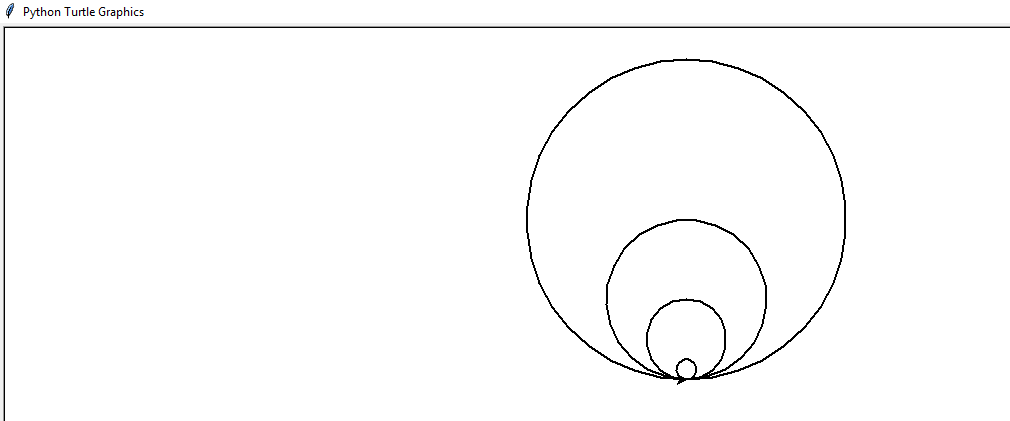
  • 同切圆的绘制:

    1
    2
    3
    4
    5
    6
    import turtle  
    turtle.pensize(2) #设置画笔大小
    turtle.circle(10) #画半径位10像素的圆
    turtle.circle(40)
    turtle.circle(80)
    turtle.circle(160)

  • 日期和时间的输出
    输出当前计算机系统的日期和时间

1
2
3
4
5
from datetime import datetime
now=datetime.now() #获得当前日期和时间
print(now)
print(now.strftime("%x")) #输出其中的日期部分
print(now.strftime("%x")) #输出其中的时间部分

关于strftime(“%x”) 我也不是很清楚

  • 画五角星
    1
    2
    3
    4
    5
    6
    7
    8
    9
    from turtle import *
    fillcolor("red")
    begin_fill()
    while True:
    forward(200)
    right(144)
    if abs(pos())<1:
    break
    end_fill()
  • 太阳花
    1
    2
    3
    4
    5
    6
    7
    8
    9
    10
    11
    from turtle import *
    color('red','yellow')
    begin_fill()
    while True:
    forward(200)
    right(170)
    if abs(pos())<1:
    break
    end_fill()
    done()

温度转换

  • 摄氏度(Celsius) 结冰点 0 沸点100
  • 华氏度(Fabrenheit) 结冰点 32 沸点212

** C=(F=32)/1.8**
*F=C1.8 +32**

1
2
3
4
5
6
7
8
9
10
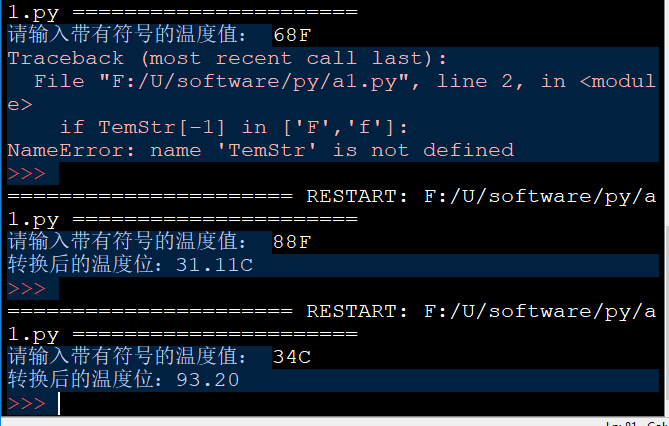
TempStr=input("请输入带有符号的温度值: ")
if TempStr[-1] in ['F','f']:
C=(eval(TempStr[0:-1])-32)/1.8
print("转换后的温度位:{:.2f}C".format(C))
elif TempStr[-1] in ['C','c']:
F=1.8*eval(TempStr[:-1]) +32
print("转换后的温度位:{:.2f}".format(F))
else:
print("error input")

文件和数据格式化

文件

文本,视频,图片等

1
2
3
4
text=open("a.txt","rt")
print(text.readline())
text.close()

文件的打开和关闭:
open()
……
…..
close()

<变量名>=open(<文件名>,<打开模式>)

文件的打开模式有七个:
|打开模式|含义|
|—|—|
|’r’|只读,默认,不存在则返回异常|
|’w’|覆盖写模式,存在也完全覆盖|
|’x’|创建写模式,存在返回异常|
|’a’|追加写模式|
|’b’|二进制|
|’t’|文本文件模式,默认|
|’+’|与r w x a一起使用,在原功能的同时基础上增加读写功能|

文件内容读写

  • 读:python将文件本身作为一个行序列
    1
    2
    3
    4
    5
    6
    7
    8
    <file>.readall()

    <file>.read(size=-1) size 表示长度

    <file>.readline(size=-1)

    <file>.readlines(hint=-1) 读入hint行,以每行为元素形成一个列表,默认则读入全部行

  • 写:
    1
    2
    3
    <file>.write(s)    
    <file>.writelines(lines)
    <file>.seek(offset) 改变当前文件操作符指针的位置, offset的值:0为文件开头,1为当前位置,2为文件结尾

    PIL库

    python image library
    pip install pillow 安装

主要处理:

  • 图像归档
  • 图像处理

    Image类

图像文件
图像文件头部的元素剧信息,这部分信息包括图像的格式,颜色,大小等。。。

  • 图像的读取和创建:

    1
    2
    3
    4
    5
    6
    7
    8
    9
    Image.open(filename)

    Image.new(mode,size,color)

    Image.open(StringIO,StringIO(buffer))

    Image.frombytes(mode,size,data)

    Image.verify()
  • 常用属性:

1
2
3
4
5
6
7
8
Image.format
表识图像格式或来源,如果图像不是从文件读取,则为none
Image.mode
图像的色彩模式,L为灰度图像,RGB,CMYK
Image.size
返回元组,(宽,高)像素
Image.palette
调色板属性

读取动态图:gif fli flc tiff等

open()自动加载第一帧

1
2
3
4
5
6
Image.seek(frame)
跳装并返回指定帧

Image.tell()
返回单前帧序号

图像转换和保存

1
2
3
4
5
6
7
8
9
Image.save(filename,format)
format是图片格式

Image.convert(mode)
新的模式

Image.thumbnail(size)
创建图像缩略图 size 是二元组

图像旋转和缩放

1
2
3
4
5
Image.resize(size)
按size大小调整图像,生成副本

Image.rotate(angle)
按angle角度旋转图像,生成副本

对通道进行操作

1
2
3
4
5
6
7
8
9
Image.point(func)

Image.split()
提取RGB图像的每个颜色通道,返回图像副本

Image.merge(mode,bands)
合并通道,mode表示色彩,bands表示新的色彩通道

Image.blend(im1,im2,alpha)

ImageFilter类

ImageEnhance类

字符画

ASCII 字符可模拟黑,白,灰
所以对每个色彩设定一个值得灰度对应字符。。。
ascii_char=list("akjdfjafj35#^&$^**$^")

定义色彩向灰度转化公式:
Gray=R*0.2126+G*0.7152+B*0.0722 R G B 是颜色值,256种灰度

RGB与字符集对应关系:

1
2
3
4
5
6
def get_char(r,b,g,alpha=256):
if alpha==0:
return ''
gray=int(r*0.2126+g*0.7152+b*0.0722)
unit=256/len(ascii_char)#一个字符代表一段取值
return ascii_char[gray//unit]一个字符代表一些灰度值
1
2
3
4
5
6
7
8
9
10
11
12
13
14
15
16
17
18
19
20
21
22
23

#e12.1DrawCharImage
from PIL import Image
ascii_char = list('"$%_&WM#*oahkbdpqwmZO0QLCJUYXzcvunxrjft/\|()1{}[]?-/+@<>i!;:,\^`.')
def get_char(r, b, g, alpha=256):
if alpha == 0:
return ' '
gray = int(0.2126 * r + 0.7152 * g + 0.0722 * b)
unit = 256 / len(ascii_char)
return ascii_char[int(gray//unit)]
def main():
im = Image.open('astro.jpg')
WIDTH, HEIGHT = 100, 60
im = im.resize((WIDTH, HEIGHT))
txt = ""
for i in range(HEIGHT):
for j in range(WIDTH):
txt += get_char(*im.getpixel((j, i)))
txt += '\n'
fo = open("pic_char.txt","w")
fo.write(txt)
fo.close()
main()

turtle库

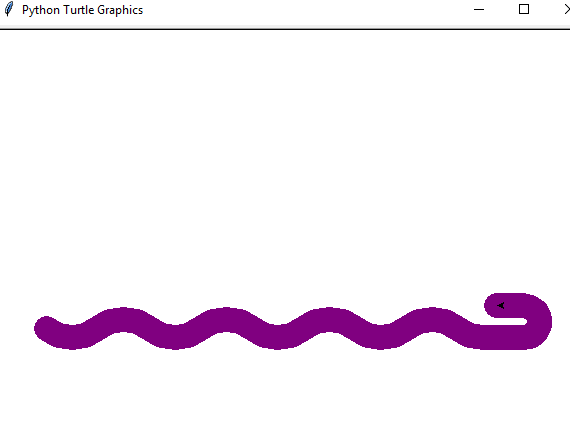
先画个蟒蛇

1
2
3
4
5
6
7
8
9
10
11
12
13
14
15
16
17
18
19
20
21
22
23
24
25
26
27
28
29
30
31
32
33
34
35
36
import turtle
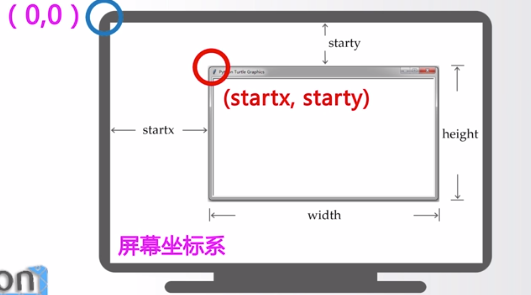
turtle.setup(600,600,600,600) #绘制一个坐标,(长,宽,开始位置x,开始位置y)

turtle.penup()
#turtle.penup()别名 turtle.pu(),turtle.up()
#抬起画笔,也就是不能画,但是可以移动
#与之对应的是turtle.pendown()
#别名 turtle.pd(),turtle.down()
#放下画笔,这个时候移到的话就会绘制了


turtle.fd(-250)
#往一个方向移到多少距离
#别名 .forward() 参数是可正可负的,负:相反方向而已

turtle.pendown()

turtle.pensize(25)
#设置画笔尺寸,线条宽度,若无则返回当前画笔宽度
#别名 .width()

turtle.pencolor("purple")
#给画笔设置颜色,可用(r,g,b)

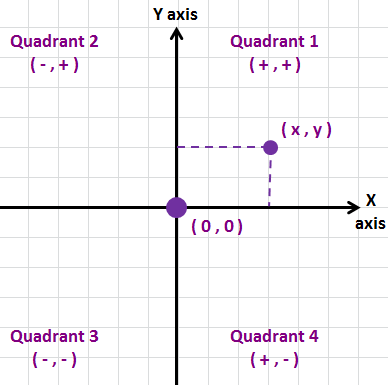
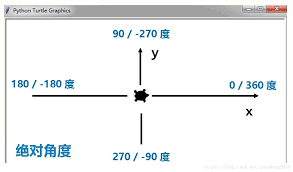
turtle.seth(-40)
#参数要个角度值,要转方向,没移动,此角度指以正东为绝对0度

for i in range(4):
turtle.circle(40,80)
turtle.circle(-40,80)
#turtle.circle(radius,extent=none) 用来绘制一个弧形,none的话为整个圆。
#(半径,扇形的角度)正值与负值的区别。。。
turtle.circle(40,80/2)
turtle.fd(40)
turtle.circle(16,180)
turtle.fd(40*2/3)

turtle.setup:

方向:

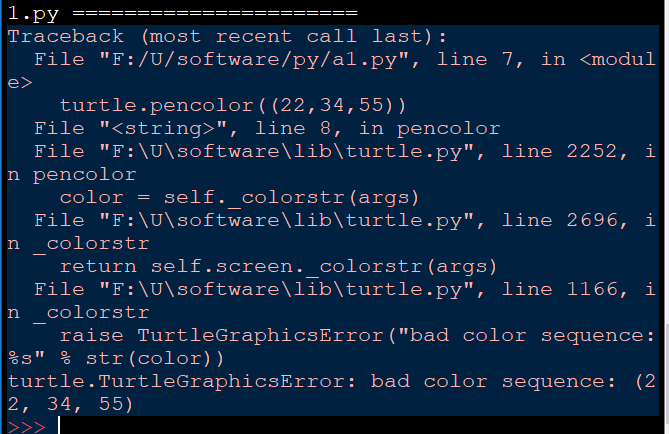
注意使用(r,g,b)时,不是所有的颜色都有,会有异常的:

turtle.seth():

random库

** python 的random库采用梅森旋转法(Mersenne Twister)生成。**
其最基本的函数是random.random()

随机数,与伪随机数

计算机是按一定的算法产生随机数的。。。是伪随机数。。

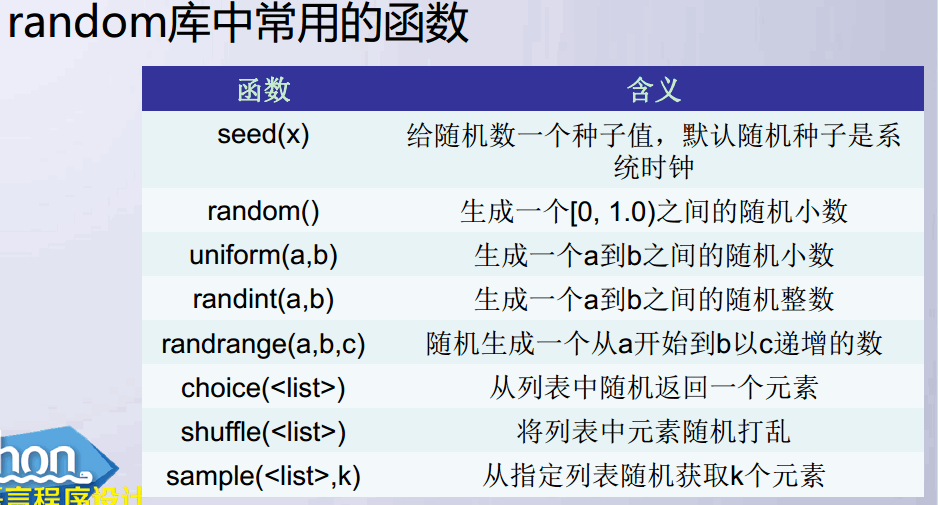
常用函数

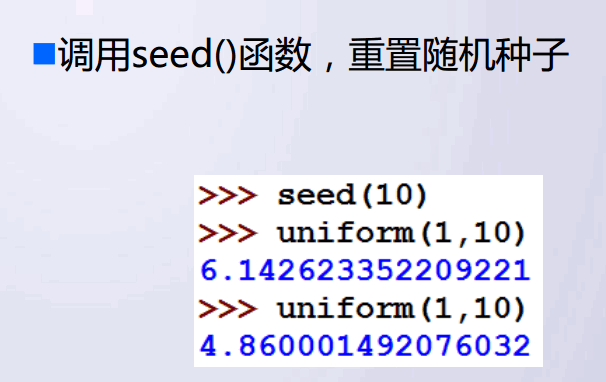
seed():

随机种子:默认当前系统时间,只要种子相同,每次生成的随机数列也相同。。。

1
2
3
4
5
6
7
8
9
10
11
12
13
14
15
16
17
18
19
20
21
>>> import random
>>> random.seed(55)
>>> random.randint(1,10)
2
>>> random.randint(1,10)
4
>>> random.randint(1,10)
3
>>> random.randint(1,10)
5
>>> random.seed(55)
>>> random.randint(1,10)
2
>>> random.randint(1,10)
4
>>> random.randint(1,10)
3
>>>
>>> random.randint(1,10)
5
>>>

计算 π 值

算法

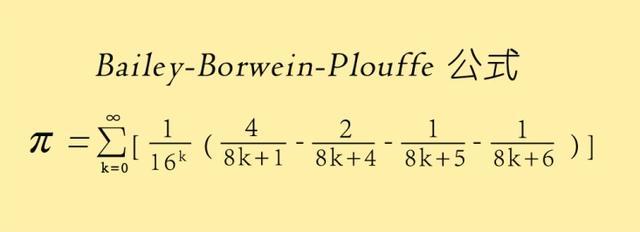
  • 迄今为止最好的计算π 值得方法 是 BBP公式:

而由于计算机得出现,使得另一种方法:
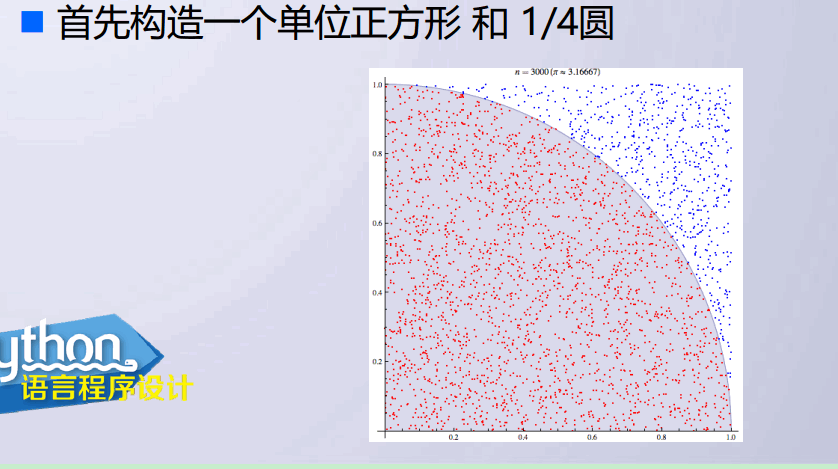
蒙特卡洛:(Monte Carlo)
试验的方法,圆内点/总的点数就是π值,因为半径为1

利用公式 πrr

1
2
3
4
5
6
7
8
9
10
11
12
13
14
from random import random
from math import sqrt
from time import clock
DARTS=10000
hits=0.0
clock()
for i in range(1,DARTS+1):
x,y=random(),random()
dist=sqrt(x**2+y**2)
if dist<=1.0:
hits=hits+1
pi=4*(hits/DARTS)
print("pi值是{}.".format(pi))
print("运行时间是:{:8.7}s".format(clock()))

结果:

1
2
3
4
5
6
7
8
9
10
11
12

Warning (from warnings module):
File "F:/U/software/py/a2.py", line 6
clock()
DeprecationWarning: time.clock has been deprecated in Python 3.3 and will be removed from Python 3.8: use time.perf_counter or time.process_time instead
pi值是3.1432.

Warning (from warnings module):
File "F:/U/software/py/a2.py", line 14
print("运行时间是:{:8.7}s".format(clock()))
DeprecationWarning: time.clock has been deprecated in Python 3.3 and will be removed from Python 3.8: use time.perf_counter or time.process_time instead
运行时间是:0.5633718s

第一次掉用clock()启动计时器,第二次返回启动计时器的时间。。。
这里它跟我说,python 3.8将把clock()移除。。。

datetime 库

处理时间日期格式化
以格林威治时间为基础
两常量 datetime.MINYEAR datetime.MAXYEAR 最小与最大年份 1, 9999
UNIX 标准时间从格林威治时间 1970年1月1日 00:00:00 精确到秒

datetime库里有这么几个东西:
datetime.date 日期表示类
datetime.time 时间表示类,至毫秒
datetime.datetime 日期和时间的表示类,覆盖date和time类
datetime.timedelta 与时间间隔有关的类
datetime.tzinfo 与时区有关的类

我们主要使用datetime库里的datetime类

所以大概这么:from datetime import datetime可以少写一点东西。。。

使用datetime.datetime类

使用datetime对象,来显示时间
创建的方法: datetime.now(),datetime.utcnoe() datetime.datetime()

1
2
today=datetime.utcnow()
返回一个datetime类型。。。

或者直接使用datetime类里的构造方法:datetime()
datetime(year,month,day[,hour[,minute[,second[,microsecond[,tzinfo]]]]])来构造一个日期。。。

datetime类的常用属性:
|属性|描述|
|—|—|
|today.min|返回datetime的最小时间对象,datetime(1,1,1,0,0)|
|today.max|返回datetime的最大时间对象,datetime(9999,12,31,23,59,59,999999)|
|today.year|年份|
|today.month|月份|
|today.day|日期|
|today.hour|小时|
|today.minute|分钟|
|today.second|秒|
|today.microsecond|微秒|

1
2
3
4
5
6
7
8
9
10
11
>>> from datetime import datetime
>>> today=datetime.now()
>>> today.day
5
>>> today.min
datetime.datetime(1, 1, 1, 0, 0)
>>> today.second
2
>>> today.microsecond
336519
>>>

datetime 常用的时间格式化方法

名字 描述
today.isoformat() ISO 8601 标准先显示时间
today.isoweekday() ISO 1~7,星期
today.strftime(format) 格式化字符串format()进行格式化,自定义
1
2
3
4
>>> today.isoformat()
'2018-05-05T13:59:02.336519'
>>> today.isoweekday()
6
  • 自定义显示
    1
    2
    3
    >>> today.strftime("%Y-%m")`
    '2018-05'`
    >>>

strftime()的格式参数:

格式化字符串 意义
%Y 年份
%m
%B 月名
%b 月名缩写
%d 日期
%A 星期
%a 星期缩写
%H 24小时
%I 12小时
%p 上下午
%M 分钟
%S

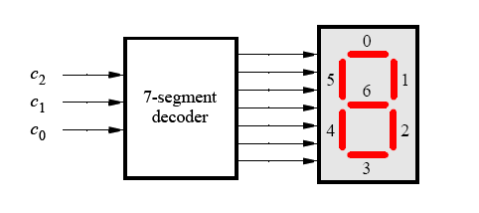
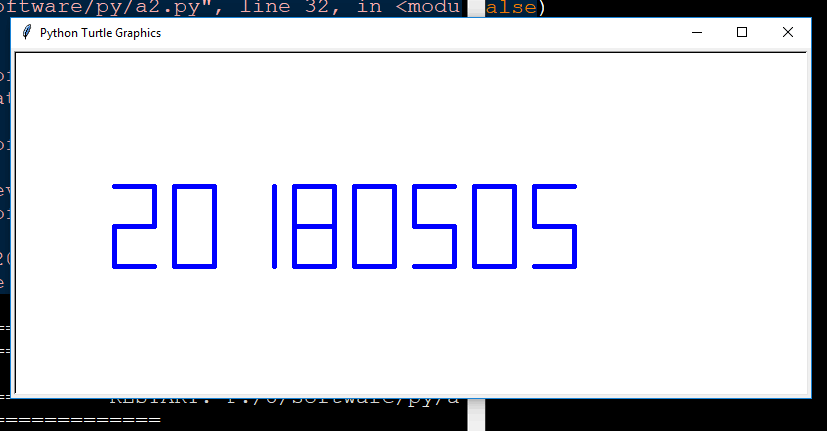
绘制数码管

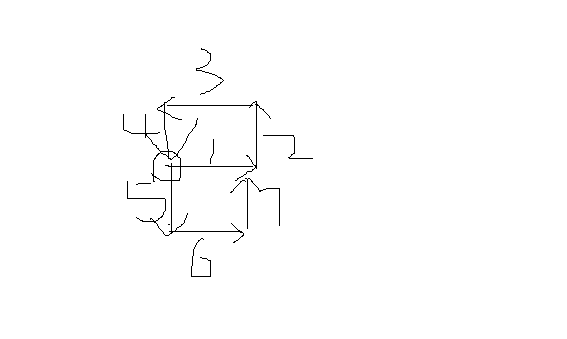
怎么绘:大概如此,顺序可换

先绘制一个当前系统时间

1
2
3
4
5
6
7
8
9
10
11
12
13
14
15
16
17
18
19
20
21
22
23
24
25
26
27
28
29
30
31
32
33
34
import turtle,datetime
def drawLine(draw):#一笔管
turtle.pendown() if draw else turtle.penup()
turtle.fd(40)
turtle.right(90)

def drawDigit(d):
drawLine(True) if d in [2,3,4,5,6,8,9] else drawLine(False) #第一笔
drawLine(True) if d in [0,1,3,4,5,6,7,8,9] else drawLine(False)
drawLine(True) if d in [0,2,3,5,6,8,9] else drawLine(False)
drawLine(True) if d in [0,2,6,8] else drawLine(False)
turtle.left(90)#往左转回去的意思!!!
drawLine(True) if d in [0,4,5,6,8,9] else drawLine(False)
drawLine(True) if d in [0,2,3,4,5,6,8,9] else drawLine(False)
drawLine(True) if d in [0,1,2,3,4,7,8,9] else drawLine(False)

turtle.left(180)
turtle.penup()
turtle.fd(20)

def drawDate(date):
for i in date:
drawDigit(eval(i))

def main():
turtle.setup(800,350,200,200)
turtle.penup()
turtle.pencolor('blue')
turtle.fd(-300)
turtle.pensize(5)
drawDate(datetime.datetime.now().strftime('%Y%m%d'))
turtle.hideturtle()
main()

注意问题来了

if 与elif问题导致出错:

1
2
3
4
5
6
7
8
9
10
11
12
13
14
15
16
17
18
19
20
21
22
23
24
25
26
27
28
29
30
31
32
33
34
35
36
37
38
39
40
41
42
43
44
45
46
47
48
49
50
51
52
53
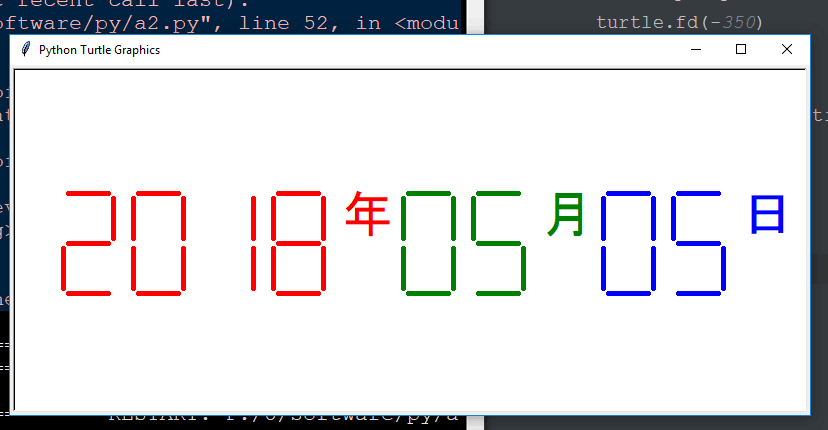
import turtle,datetime

def drawGap():#绘制数码管间隔
turtle.penup()
turtle.fd(5)

def drawLine(draw):#一笔管
drawGap()
turtle.pendown() if draw else turtle.penup()
turtle.fd(40)
drawGap()
turtle.right(90)

def drawDigit(d):
drawLine(True) if d in [2,3,4,5,6,8,9] else drawLine(False) #第一笔
drawLine(True) if d in [0,1,3,4,5,6,7,8,9] else drawLine(False)
drawLine(True) if d in [0,2,3,5,6,8,9] else drawLine(False)
drawLine(True) if d in [0,2,6,8] else drawLine(False)
turtle.left(90)#往左转回去的意思!!!
drawLine(True) if d in [0,4,5,6,8,9] else drawLine(False)
drawLine(True) if d in [0,2,3,4,5,6,8,9] else drawLine(False)
drawLine(True) if d in [0,1,2,3,4,7,8,9] else drawLine(False)

turtle.left(180)
turtle.penup()
turtle.fd(20)

def drawDate(date):
turtle.pencolor('red')
for i in date:
if i== '-':
turtle.write('年',font=("Arial",18,"normal"))
turtle.pencolor('green')
turtle.fd(40)
if i== '=':
turtle.write('月',font=("Arial",18,"normal"))
turtle.pencolor('blue')
turtle.fd(40)
if i== '+':
turtle.write('日',font=("Arial",18,"normal"))
else:
drawDigit(eval(i))

def main():
turtle.setup(800,350,200,200)
turtle.penup()
# turtle.pencolor('blue')
turtle.fd(-350)
turtle.pensize(5)
drawDate(datetime.datetime.now().strftime('%Y-%m=%d+'))
turtle.hideturtle()
main()

错误反馈:

1
2
3
4
5
6
7
8
9
10
11
12
Traceback (most recent call last):
File "F:/U/software/py/a2.py", line 52, in <module>
main()
File "F:/U/software/py/a2.py", line 50, in main
drawDate(datetime.datetime.now().strftime('%Y-%m=%d+'))
File "F:/U/software/py/a2.py", line 42, in drawDate
drawDigit(eval(i))
File "<string>", line 1
-
^
SyntaxError: unexpected EOF while parsing
>>>

正确的是:

1
2
3
4
5
6
7
8
9
10
11
12
13
14
15
16
17
18
19
20
21
22
23
24
25
26
27
28
29
30
31
32
33
34
35
36
37
38
39
40
41
42
43
44
45
46
#e7.2DrawSevenSegDisplay.py
import turtle, datetime
def drawGap(): #绘制数码管间隔
turtle.penup()
turtle.fd(5)
def drawLine(draw): #绘制单段数码管
drawGap()
turtle.pendown() if draw else turtle.penup()
turtle.fd(40)
drawGap()
turtle.right(90)
def drawDigit(d): #根据数字绘制七段数码管
drawLine(True) if d in [2,3,4,5,6,8,9] else drawLine(False)
drawLine(True) if d in [0,1,3,4,5,6,7,8,9] else drawLine(False)
drawLine(True) if d in [0,2,3,5,6,8,9] else drawLine(False)
drawLine(True) if d in [0,2,6,8] else drawLine(False)
turtle.left(90)
drawLine(True) if d in [0,4,5,6,8,9] else drawLine(False)
drawLine(True) if d in [0,2,3,5,6,7,8,9] else drawLine(False)
drawLine(True) if d in [0,1,2,3,4,7,8,9] else drawLine(False)
turtle.left(180)
turtle.penup()
turtle.fd(20)
def drawDate(date):
turtle.pencolor("red")
for i in date:
if i == '-':
turtle.write('年',font=("Arial", 18, "normal"))
turtle.pencolor("green")
turtle.fd(40)
elif i == '=':
turtle.write('月',font=("Arial", 18, "normal"))
turtle.pencolor("blue")
turtle.fd(40)
elif i == '+':
turtle.write('日',font=("Arial", 18, "normal"))
else:
drawDigit(eval(i))
def main():
turtle.setup(800, 350, 200, 200)
turtle.penup()
turtle.fd(-350)
turtle.pensize(5)
drawDate(datetime.datetime.now().strftime('%Y-%m=%d+'))
turtle.hideturtle()
main()

递归

n的阶乘:

1
2
3
4
5
6
7
def fact(n):
if n==0:
return 1
else:
return n*fact(n-1)
num=eval(input("请输入一个整数: "))
print(fact(abs(int(num))))

主要是return语句的使用。。。
当然也可以没有return语句。。

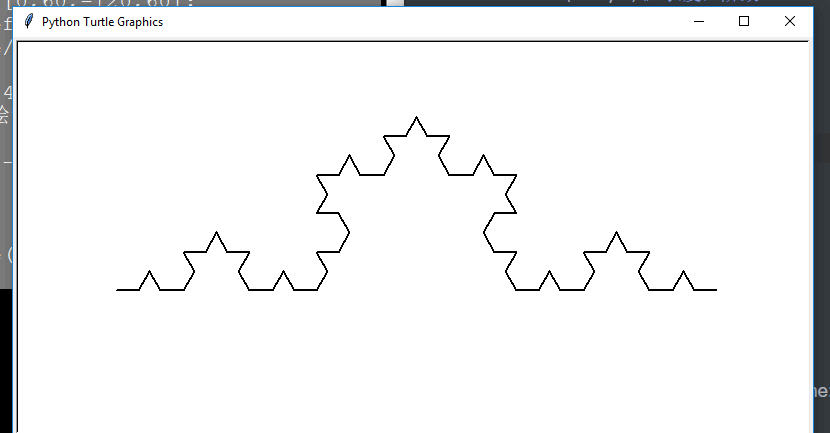
科赫曲线

n阶科赫曲线

1
2
3
4
5
6
7
8
9
10
11
12
13
14
15
16
17
18
19
import turtle
def koch(size,n):
if n==0:
turtle.fd(size)
else:
for angle in [0,60,-120,60]:
turtle.left(angle)
koch(size/3,n-1)
def main():
turtle.setup(800,400)
turtle.speed(0)#绘制速度
turtle.penup()
turtle.goto(-300,-50)
turtle.pendown()
turtle.pensize(2)
koch(600,3)# 长度,阶数
turtle.hideturtle()
main()

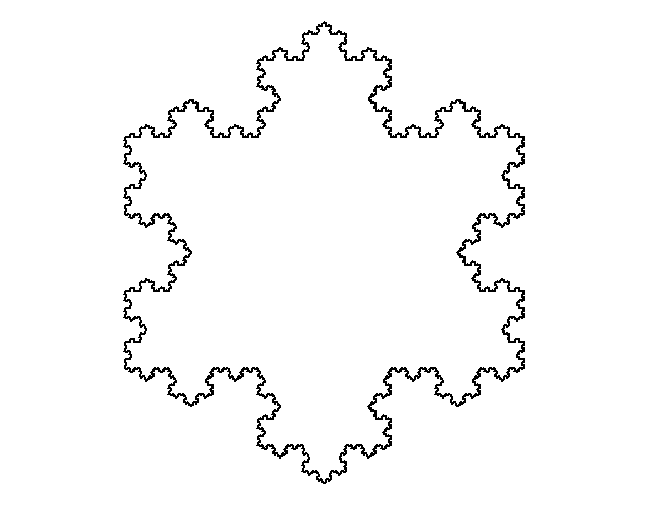
画个雪花

1
2
3
4
5
6
7
8
9
10
11
12
13
14
15
16
17
18
19
20
21
22
23
24
import turtle
def koch(size,n):
if n==0:
turtle.fd(size)
else:
for angle in [0,60,-120,60]:
turtle.left(angle)
koch(size/3,n-1)
def main():
turtle.setup(600,600)
turtle.speed(-5)#绘制速度
turtle.penup()
turtle.goto(-200,100)
turtle.pendown()
turtle.pensize(2)
level=5
koch(400,level)
turtle.right(120)
koch(400,level)
turtle.right(120)
koch(400,level)# 长度,阶数
turtle.hideturtle()
main()


好好理解递归思想!!!

1
2
3
4
5
6
7
8
9
10
11
12
13
14
15
16
17
18
19
20
21
22
23
24
25
26
27
28
29
30
31
32
33
34
35
36
37
38
39
40
41
42
43
44
45
46
47
48
49
50
51
52
53
54
55
56
57
58
59
60
61
62
63
64
65
66
67
68
69
70
71
72
73
74
75
76
77
78
79
80
81
82
83
84
85
86
87
88
89
90
91
92
93
94
95
96
97
98
99
100
101
102
103
104
105
106
107
108
109
110
111
112
113
114
115
116
117
118
119
120
121
122
123
124
125
126
127
128
129
130
131
132
133
134
135
136
137
138
139
140
141
142
143
144
145
146
147
148
149
150
151
152
153
154
155
156
157
158
159
160
161
162
163
164
165
166
167
168
169
170
171
172
173
174
175
176
177
178
179
180
181
182
183
184
185
186
187
188
189
190
191
192
193
194
195
196
197
198
199
200
201
202
203
204
205
206
 >>> help(datetime)
Help on class datetime in module datetime:

class datetime(date)
| datetime(year, month, day[, hour[, minute[, second[, microsecond[,tzinfo]]]]])
|
| The year, month and day arguments are required. tzinfo may be None, or an
| instance of a tzinfo subclass. The remaining arguments may be ints.
|
| Method resolution order:
| datetime
| date
| builtins.object
|
| Methods defined here:
|
| __add__(self, value, /)
| Return self+value.
|
| __eq__(self, value, /)
| Return self==value.
|
| __ge__(self, value, /)
| Return self>=value.
|
| __getattribute__(self, name, /)
| Return getattr(self, name).
|
| __gt__(self, value, /)
| Return self>value.
|
| __hash__(self, /)
| Return hash(self).
|
| __le__(self, value, /)
| Return self<=value.
|
| __lt__(self, value, /)
| Return self<value.
|
| __ne__(self, value, /)
| Return self!=value.
|
| __radd__(self, value, /)
| Return value+self.
|
| __reduce__(...)
| __reduce__() -> (cls, state)
|
| __reduce_ex__(...)
| __reduce_ex__(proto) -> (cls, state)
|
| __repr__(self, /)
| Return repr(self).
|
| __rsub__(self, value, /)
| Return value-self.
|
| __str__(self, /)
| Return str(self).
|
| __sub__(self, value, /)
| Return self-value.
|
| astimezone(...)
| tz -> convert to local time in new timezone tz
|
| ctime(...)
| Return ctime() style string.
|
| date(...)
| Return date object with same year, month and day.
|
| dst(...)
| Return self.tzinfo.dst(self).
|
| isoformat(...)
| [sep] -> string in ISO 8601 format, YYYY-MM-DDT[HH[:MM[:SS[.mmm[uuu]]]]][+HH:MM].
| sep is used to separate the year from the time, and defaults to 'T'.
| timespec specifies what components of the time to include (allowed values are 'auto', 'hours', 'minutes', 'seconds', 'milliseconds', and 'microseconds').
|
| replace(...)
| Return datetime with new specified fields.
|
| time(...)
| Return time object with same time but with tzinfo=None.
|
| timestamp(...)
| Return POSIX timestamp as float.
|
| timetuple(...)
| Return time tuple, compatible with time.localtime().
|
| timetz(...)
| Return time object with same time and tzinfo.
|
| tzname(...)
| Return self.tzinfo.tzname(self).
|
| utcoffset(...)
| Return self.tzinfo.utcoffset(self).
|
| utctimetuple(...)
| Return UTC time tuple, compatible with time.localtime().
|
| ----------------------------------------------------------------------
| Class methods defined here:
|
| combine(...) from builtins.type
| date, time -> datetime with same date and time fields
|
| fromisoformat(...) from builtins.type
| string -> datetime from datetime.isoformat() output
|
| fromtimestamp(...) from builtins.type
| timestamp[, tz] -> tz's local time from POSIX timestamp.
|
| now(tz=None) from builtins.type
| Returns new datetime object representing current time local to tz.
|
| tz
| Timezone object.
|
| If no tz is specified, uses local timezone.
|
| strptime(...) from builtins.type
| string, format -> new datetime parsed from a string (like time.strptime()).
|
| utcfromtimestamp(...) from builtins.type
| Construct a naive UTC datetime from a POSIX timestamp.
|
| utcnow(...) from builtins.type
| Return a new datetime representing UTC day and time.
|
| ----------------------------------------------------------------------
| Static methods defined here:
|
| __new__(*args, **kwargs) from builtins.type
| Create and return a new object. See help(type) for accurate signature.
|
| ----------------------------------------------------------------------
| Data descriptors defined here:
|
| fold
|
| hour
|
| microsecond
|
| minute
|
| second
|
| tzinfo
|
| ----------------------------------------------------------------------
| Data and other attributes defined here:
|
| max = datetime.datetime(9999, 12, 31, 23, 59, 59, 999999)
|
| min = datetime.datetime(1, 1, 1, 0, 0)
|
| resolution = datetime.timedelta(microseconds=1)
|
| ----------------------------------------------------------------------
| Methods inherited from date:
|
| __format__(...)
| Formats self with strftime.
|
| isocalendar(...)
| Return a 3-tuple containing ISO year, week number, and weekday.
|
| isoweekday(...)
| Return the day of the week represented by the date.
| Monday == 1 ... Sunday == 7
|
| strftime(...)
| format -> strftime() style string.
|
| toordinal(...)
| Return proleptic Gregorian ordinal. January 1 of year 1 is day 1.
|
| weekday(...)
| Return the day of the week represented by the date.
| Monday == 0 ... Sunday == 6
|
| ----------------------------------------------------------------------
| Class methods inherited from date:
|
| fromordinal(...) from builtins.type
| int -> date corresponding to a proleptic Gregorian ordinal.
|
| today(...) from builtins.type
| Current date or datetime: same as self.__class__.fromtimestamp(time.time()).
|
| ----------------------------------------------------------------------
| Data descriptors inherited from date:
|
| day
|
| month
|
| year

>>>

jieba库

第三方中文分词函数库
把一大段话分解为一个个词或字

使用pip工具安装
pip install jieba

结巴库分三种模式:

  1. 精确模式 精确的分开
  2. 全模式 速度块
  3. 搜索引擎模式 在精确的模式上再次切分

常用分词函数

1
2
3
4
5
6
7
8
9
10
11
12
13
14
jieba.cut(s)  精确模式,返回一个迭代类型

jieba.cut(s,cut_all=True) 全模式

jieba.cut_for_search(s) 搜索引擎模式

jieba.lcut(s) 精确模式,但是返回列表类型

jieba.lcut(s,cut_all=Ture) 全模式,返回列表

jieba.lcut_for_search(s) 搜索引擎模式,返回一个列表

jieba.add_word(w) 向分词词典中增加一个新词 w

文本词频统计

英文

1
2
3
4
5
6
7
8
9
10
11
12
13
14
15
16
17
18
#cal hamlet numbers

def getText():
txt=open("ss.txt","r",encoding='utf-8').read()
txt=txt.lower()
for ch in '!"#$%&*()+_-,.-/:;<=>?@[\\]^`~':
txt=txt.replace(ch," ")
return txt
hamletTxt=getText()
words=hamletTxt.split()
counts = {}
for word in words:
counts[word]=counts.get(word,0)+1
items =list(counts.items())
items.sort(key=lambda x:x[1],reverse=True)#匿名函数,key:排序方式,reverse:是否反序
for i in range (10):
word,count=items[i]
print("{0:<10}{1:>5}".format(word,count))
1
2
3
4
5
6
7
8
9
10
11
12
13
>>> 
====================== RESTART: F:/U/software/py/a2.py ======================
the 1137
and 965
to 754
of 667
you 550
a 542
i 541
my 514
hamlet 461
in 436
>>>

中文

使用jieba库

1
2
3
4
5
6
7
8
9
10
11
12
13
14
15
16
17
18
19
20
21
22
23
24
25
26
27
#e10.4CalThreeKingdoms.py
import jieba
excludes = {"将军","却说","荆州","二人","不可","不能","如此"}
txt = open("三国演义.txt", "r", encoding='utf-8').read()
words = jieba.lcut(txt)
counts = {}
for word in words:
if len(word) == 1:
continue
elif word == "诸葛亮" or word == "孔明曰":
rword = "孔明"
elif word == "关公" or word == "云长":
rword = "关羽"
elif word == "玄德" or word == "玄德曰":
rword = "刘备"
elif word == "孟德" or word == "丞相":
rword = "曹操"
else:
rword = word
counts[rword] = counts.get(rword,0) + 1
for word in excludes:
del(counts[word])
items = list(counts.items())
items.sort(key=lambda x:x[1], reverse=True)
for i in range(5):
word, count = items[i]
print ("{0:<10}{1:>5}".format(word, count))
-------------本文结束感谢您的阅读-------------