面向python 3.5.x 3.6.x
python 进阶
问题 if name == ‘main ‘ 如何正确理解? https://www.zhihu.com/question/49136398
链接mysql https://taizilongxu.gitbooks.io/stackoverflow-about-python/content/80/README.html
pip升级到18 出现不能安装库
Traceback (most recent call last): <module> sys.exit(__main__.main())
网上找了说改成__main__.main()还是不行
于是降级成9https://stackoverflow.com/questions/49839610/attributeerror-module-pip-has-no-attribute-mainpip
学到个东西:python -m pip install....pip install ... 有什么区别
之后又出现下载超时,只得先下载到本地然后使用本地安装了python -m pip install pip...
python 练手项目 https://www.zhihu.com/question/29372574
一些说明 Argument Clinic 概念 1 2 3 4 5 6 7 8 Help on built-in function sum in module builtins: sum(iterable, start=0, /) Return the sum of a 'start' value (default: 0) plus an iterable of numbers When the iterable is empty, return the start value. This function is intended specifically for use with numeric values and may reject non-numeric types.
当看到sum(iterable,start=0,/)时,最后一个参数是/,这个东西表示此函数只接受位置参数,而不接受关键参数的形式传值。
`sum([1,2,3],start=11)是错误的,这个就叫做关键参数。 sum([1,2,3],11)`这才是对的,位置参数
在python中无需声明变量名及其类型。。
是强类型语言,判断其类型使用的是状态机!!
数字类型,整型:其大小与机器有关,无上限
有字符串类型的常量与变量
没有字符的常量与变量
单个字符也是字符串
1 2 3 + 只可用在同类型 * 字典与集合不可与整数相乘
1 python的IDLE里,下划线_ 表示最近一次运行的正确结果。
函数式编程
函数式编程把问题分解为一系列的函数操作,依次流入和流出一系列函数。
map()
in 与is
in 与is
位运算符:运用于整数
将整数转换为二进制 再右对齐,左补0 然后按位运算。。再转回十进制
1 2 3 4 5 6 7 8 9 10 11 12 13 14 15 16 17 18 19 20 21 22 23 24 25 26 27 28 29 30 31 32 33 34 35 36 37 38 39 40 41 42 43 44 >>> >>> 1 &1 1 >>> 0 &1 0 >>> 1 &0 0 >>> 0 &0 0 >>> >>> 1 |1 1 >>> 0 |1 1 >>> 0 |0 0 >>> >>> >>> 1 ^1 0 >>> 0 &0 0 >>> 1 ^0 1 >>> 0 ^1 1 >>> >>> 2 |2 2 >>> 1 <<1 2 >>> 2 <<2 8 >>> 1 >>1 0 >>> 2 >>1 1 >>> 5 >>1 2 >>>
and or
运算符and or 一般用于条件表达式中
python中不支持++ – 所表达的意思正正得正,负负得负
位置参数
当你看到某个函数的使用位sum(a,b,c,/) 最后一个/表示这个函数只接受位置参数,而不允许以关键参数的形式进行传值。。
eval:对字符串求值。。。
对缓冲区的操作
python 的标准库sys 下的 read() 及readline()函数
1 2 sys.stdin.read(5 ) sys.stdin.readline(4 )
惰性求值 惰性求值(英语:Lazy Evaluation)也称为传需求调用(call-by-need)它的目的是要最小化计算机要做的工作。它有两个相关而又有区别的含意,可以表示为“延迟求值”和“最小化求值”,
惰性求值,也就是延迟求值,表达式不会在它被绑定到变量之后就立即求值,而是等用到时再求值。这个特性可以解决一些巨大甚至无限的集合列表,如菲波那切数列、几十G的文件等等。延迟求值的一个好处是能够建立可计算的无限列表而没有妨碍计算的无限循环或大小问题。
迭代 wiki:
各种语言实作迭代器的方式皆不尽同,有些面向对象语言像Java, C#, Ruby, Python, Delphi都已将迭代器的特性内建语言当中,完美的跟语言整合,我们称之隐式迭代器(implicit iterator),但像是C++语言本身就没有迭代器的特色,但STL仍利用模板实作了功能强大的迭代器。STL容器的数据的内存地址可能会重新分配(reallocate),与容器绑定的迭代器仍然可以定位到重新分配后的正确的内存地址。
迭代器另一方面还可以整合生成器(generator)。有些语言将二者视为同一界面,有些语言则将之独立化。
我们已经知道,可以直接作用于for循环的数据类型有以下几种:
Python的Iterator对象表示的是一个数据流,Iterator对象可以被next()函数调用并不断返回下一个数据,直到没有数据时抛出StopIteration错误。可以把这个数据流看作是一个有序序列,但我们却不能提前知道序列的长度,只能不断通过next()函数实现按需计算下一个数据,所以Iterator的计算是惰性的,只有在需要返回下一个数据时它才会计算。
https://blog.csdn.net/yizheyouye/article/details/50649974
Python中任意的对象,只要它定义了可以返回一个迭代器的__iter__方法,或者定义了可以支持下标索引的__getitem__方法(这些双下划线方法会在其他章节中全面解释),那么它就是一个可迭代对象。简单说,可迭代对象就是能提供迭代器的任意对象。
任意对象,只要定义了next(Python2) 或者__next__方法,它就是一个迭代器。就这么简单。现在我们来理解迭代(iteration)
用简单的话讲,它就是从某个地方(比如一个列表)取出一个元素的过程。当我们使用一个循环来遍历某个东西时,这个过程本身就叫迭代。
https://eastlakeside.gitbooks.io/interpy-zh/content/Generators/Iterator.html
个人博客:python 中的可迭代对象(iterable)、迭代器(iterator)与生成器(generator)http://wulc.me/2016/09/08/python%20%E4%B8%AD%E7%9A%84%E5%8F%AF%E8%BF%AD%E4%BB%A3%E5%AF%B9%E8%B1%A1(iterable)%E3%80%81%E8%BF%AD%E4%BB%A3%E5%99%A8(iterator)%E4%B8%8E%E7%94%9F%E6%88%90%E5%99%A8(generator)/
官方:https://docs.python.org/3/tutorial/classes.html#iterators
内置函数 枚举与迭代 enumerate:
1 2 3 4 5 6 7 8 9 10 11 12 13 14 15 16 17 18 19 20 21 22 23 24 25 26 27 28 29 30 31 32 33 34 35 36 37 38 39 40 41 42 43 44 45 46 47 48 49 50 51 enumerate() 枚举可迭代对象中的元素返回enumerate对象,其中每个元素都是包含索引和值的元组 enumerate()还支持一个参数,start来开始索引起始值 >>> list(enumerate('abcd' )) [(0 , 'a' ), (1 , 'b' ), (2 , 'c' ), (3 , 'd' )] >>> list(enumerate(s)) [(0 , 'a' ), (1 , 'b' ), (2 , 'c' )] >>> list(enumerate(s.items())) [(0 , ('a' , 1 )), (1 , ('b' , 2 )), (2 , ('c' , 3 ))] >>> list(enumerate({'a' :1 ,'b' :2 })) [(0 , 'a' ), (1 , 'b' )] for item in enumerate(range(5 ),6 )>>> for item in enumerate(range(5 ),6 ): print(item,end=',' ) (6 , 0 ),(7 , 1 ),(8 , 2 ),(9 , 3 ),(10 , 4 ), >>> ```` iter(): >返回对象的迭代器 >两种用法 `iter(iterable) iter(callable,sentinel)` >iter(iterable)要求参数必须有自己的迭代器 >iter(callable,sentinel)会持续调用callable直至其返回sentinel next()函数用来返回可迭代对象中的下一个元素,适用于生成器对象及 zip 等对象,等价于这些对象的`__next__()`方法 >`map()`把一个函数 func() 依次映射到序列或迭代器对象的每个元素上,并返回一个可迭代map对象作为结果 >也就是经过func()操作过的元素,不修改原可迭代对象。。 ``` python >>> list(map(str,range(5 )))['0' , '1' , '2' , '3' , '4' ] >>> def add5 (v ): return v+5 ; >>> list(map(add5,range(10 )))[5 , 6 , 7 , 8 , 9 , 10 , 11 , 12 , 13 , 14 ] >>> list(map(lambda x,y:x+y,range(5 ),range(5 ,10 )))[5 , 7 , 9 , 11 , 13 ]
1 2 3 4 map(func, *iterables) --> map object Make an iterator that computes the function using arguments from | each of the iterables. Stops when the shortest iterable is exhausted.
在python 3中,reduce 函数不是内置函数,而是放到functools里了。from functools import reduce
reduce():将一个接受两个参数的函数以迭代累积的方式从左到右依次作用到一个序列或迭代器对象的所有元素上,并且允许指定一个初始值。 初始值也是会传入函数里的,作为第一个参数。。
如:reduce(lambda x,y:x+y,[1,2,3,4,5])((((1+2)+3)+4)+5)
1 2 3 4 5 6 7 8 9 10 11 12 13 >>> help(reduce) Help on built-in function reduce in module _functools: reduce(...) reduce(function, sequence[, initial]) -> value Apply a function of two arguments cumulatively to the items of a sequence, from left to right, so as to reduce the sequence to a single value. For example, reduce(lambda x, y: x+y, [1, 2, 3, 4, 5]) calculates ((((1+2)+3)+4)+5). If initial is present, it is placed before the items of the sequence in the calculation, and serves as a default when the sequence is empty.
1 2 3 4 5 6 7 8 9 10 11 12 13 14 15 16 17 18 19 20 21 22 23 24 25 26 27 28 29 30 31 32 33 34 35 36 >>> seq=list(range(1 ,10 ))>>> reduce(lambda x,y:x+y,seq)45 >>> >>> import operator>>> operator.add(4 ,4 )8 >>> reduce(operator.add,seq)45 >>> reduce(operator.mul,seq,1 )362880 >>> reduce(operator.add,[[1 ,2 ],[3 ]],[])[1 , 2 , 3 ] 计算元素出现个数: >>> from random import randint>>> lst=[randint(1 ,10 ) for i in range(50 )]>>> reduce(tjNum,lst,{}){9 : 5 , 2 : 3 , 5 : 7 , 6 : 5 , 8 : 5 , 7 : 7 , 10 : 9 , 1 : 6 , 3 : 3 } >>> def tjNum (dic,k ): print(dic,k) if k in dic: dic[k]+=1 else : dic[k]=1 return dic >>> reduce(tjNum,[1 ,1 ],{}) {} 1 {1 : 1 } 1 {1 : 2 }
filter():
将一个单参函数作用到一个序列上,返回该序列中使得该函数返回true的那些元素组成的filter()对象,如果指定函数为None,则返回序列中等价于true的元素
1 2 3 4 5 6 7 8 9 10 11 12 13 14 >>> seq=['foo' ,'x41' ,'?!' ,',' ,'* * *' ] >>> def func (x ): return x.isalnum() >>> filter(func,seq) <filter object at 0x032E1230 > >>> list(_) ['foo' , 'x41' ] >>> list(filter(None ,[0 ,1 ,2 ,3 ,3 ,2 ,1 ,0 ,0 ,12 ]))[1 , 2 , 3 , 3 , 2 , 1 , 12 ]
类型转换与类型判断 bin() oct() hex() 参数都是整数!!!
int() int()
隐含进制:0x 0b 0o
字符串没有隐含进制,所以需要说明是什么进制 范围:或0 2~36
1 2 3 4 5 6 7 8 9 10 11 12 13 14 15 16 Help on class int in module builtins : class int (object ) | int ([x] ) -> integer | int(x, base=10) -> integer | | Convert a number or string to an integer, or return 0 if no arguments | are given. If x is a number, return x.__int__(). For floating point | numbers, this truncates towards zero. | | If x is not a number or if base is given, then x must be a string, | bytes, or bytearray instance representing an integer literal in the | given base. The literal can be preceded by '+' or '-' and be surrounded | by whitespace. The base defaults to 10. Valid bases are 0 and 2-36. | Base 0 means to interpret the base from the string as an integer literal.
float() complex() float()
ord() chr() str() ord()只节一个字符
sorted() reversed()
sorted()对可迭代对象(列表,元组,字典,集合等)进行排序并返回新列表。zip map filter enumerate等类似对象除外 )进行翻转并返回可迭代的reversed对象。
max() min() sum()
计算可迭代对象的所有元素中的
1 2 3 4 5 6 7 >>> from random import randint >>> a=[randint(1 ,100 ) for i in range(10 )]>>> print(max(a),min(a),sum(a))93 9 599 >>> sum(a)/len(a)59.9
max与min 都支持default参数和key参数,其中default参数用来指定可迭代对象为空时默认返回的最大值与最小值,而key参数用来指定比较大小的依据或规则。
1 2 3 4 5 6 7 8 9 10 11 12 13 14 15 16 17 18 19 20 21 22 23 24 25 26 27 28 29 30 31 32 33 34 35 >>> max(['2' ,'111' ])'2' >>> max(['2' ,'111' ],key=len)'111' >>> print(max([],default=None ))None >>> from random import randint>>> lst=[[randint(1 ,50 ) for i in range(5 ) ] for j in range(30 )] >>> lst[[26 , 46 , 13 , 50 , 29 ], [35 , 13 , 34 , 47 , 27 ], [1 , 32 , 17 , 31 , 3 ], [14 , 10 , 47 , 4 , 22 ], [29 , 17 , 22 , 34 , 50 ], [29 , 22 , 39 , 34 , 14 ], [21 , 46 , 31 , 46 , 32 ], [6 , 28 , 16 , 27 , 30 ], [39 , 32 , 3 , 16 , 14 ], [9 , 28 , 35 , 42 , 23 ], [41 , 21 , 7 , 22 , 5 ], [1 , 3 , 32 , 46 , 17 ], [22 , 17 , 12 , 50 , 16 ], [22 , 48 , 26 , 12 , 21 ], [30 , 40 , 47 , 34 , 45 ], [15 , 20 , 29 , 20 , 9 ], [12 , 20 , 33 , 38 , 7 ], [24 , 31 , 50 , 29 , 15 ], [43 , 11 , 37 , 5 , 21 ], [10 , 41 , 6 , 46 , 37 ], [44 , 21 , 4 , 29 , 13 ], [18 , 10 , 41 , 17 , 10 ], [19 , 38 , 8 , 25 , 6 ], [23 , 47 , 12 , 33 , 9 ], [6 , 29 , 42 , 29 , 41 ], [4 , 18 , 25 , 13 , 33 ], [29 , 38 , 4 , 32 , 1 ], [18 , 29 , 10 , 1 , 44 ], [15 , 50 , 45 , 31 , 37 ], [48 , 45 , 18 , 4 , 36 ]] >>> max(*lst,key=sum)[30 , 40 , 47 , 34 , 45 ] >>> max(lst,key=sum)#同上[30 , 40 , 47 , 34 , 45 ] >>> max(lst,key=lambda x:x[1 ])[15 , 50 , 45 , 31 , 37 ] >>> sum(range(11 ))# start参数默认是055 >>> sum(range(1 ,11 ),5 )# 给start赋值560 >>> sum([[1 ,2 ],[3 ,],[4 ]],[])# 占用空间大,慎用[1 , 2 , 3 , 4 ] >>> sum(2 **i for i in range(200 ))#等比数列前n项和2 **i1606938044258990275541962092341162602522202993782792835301375 >>> int('1' *200 ,2 )1606938044258990275541962092341162602522202993782792835301375 >>> int('1' *200 ,7 )# 比值q为2 ~36 的都可以这样做1743639715219059529169816601969468943303198091695038943325023347339187627904043708629063769151560675048844208042091052362343863390613931864691792377889969422439576020000 >>> sum(range(101 ))5050 >>> 101 *100 //2 5050 >>>
zip
把多个可迭代对象中的元素压缩到一起,返回一个可迭代的zip对象,其中每个元素都是包含原来的多个可迭代对象对应位置上的元素的元组,最终结果包含的元素个数取决于所有参数序列或可迭代对象中最短的那个。
1 2 3 4 5 6 7 8 9 10 11 12 13 14 15 16 >>> list(zip('abcde' )) [('a' ,), ('b' ,), ('c' ,), ('d' ,), ('e' ,)] >>> list(zip([1 ,2 ,3 ],'abc' ,(11 ,22 ,33 ))) [(1 , 'a' , 11 ), (2 , 'b' , 22 ), (3 , 'c' , 33 )] >>> z=zip('111' ,'aaa' ) >>> list(z) [('1' , 'a' ), ('1' , 'a' ), ('1' , 'a' )] >>> list(z) []
序列结构
分类
可变序列,不可变序列
双向索引
列表 开销大,功能强大。。
包含若干元素的有序连续内存空间。。列表对象自动进行内车的扩展或收缩 []
python采用基于值的自动内存管理模式,变量并不直接存储值
创建列表 a=[a,b]a=[]
1 2 3 4 5 6 7 8 9 >>> list('qwert yy' )['q' , 'w' , 'e' , 'r' , 't' , ' ' , 'y' , 'y' ] >>> list(12345 )Traceback (most recent call last): File "<pyshell#26>" , line 1 , in <module> list(12345 ) TypeError: 'int' object is not iterable >>> list(range(1 ,10 ,2 ))[1 , 3 , 5 , 7 , 9 ]
list()将可迭代对象转化为列表
把字典转化为列表时,默认是将 “键”转化为列表
1 2 3 >>> a={1 :2 ,2 :3 }>>> list(a)[1 , 2 ]
而想将字典的键值转化为列表,需要使用dict.items()
1 2 3 4 5 >>> a{1 : 2 , 2 : 3 } >>> list(a.items())[(1 , 2 ), (2 , 3 )] >>>
当你想删除某个对象时,delgc模块的collect()方法。。
1 2 3 4 5 import gcgc.collect() import syssys.getrefcount(1 )
1 2 3 4 5 6 7 8 9 10 11 12 13 14 15 16 17 18 19 20 21 22 23 24 25 >>> import sys>>> sys.getrefcount(1 )831 >>> y=1 >>> sys.getrefcount(1 )832 >>> z=1 >>> sys.getrefcount(1 )833 >>> del y>>> sys.getrefcount(1 )832 >>> del z>>> sys.getrefcount(1 )831 >>> import gc>>> gc.cllect()>>> gc.collect()199 >>> sys.getrefcount(1 )833 >>> gc.collect(1 )22 >>> sys.getrefcount(1 )833
元素访问
双向索引
列表常用方法
append() insert() extend()
都是添加元素原地操作 ,不影响列表对象在内存中的起始地址。
想在列表头加入多个元素时,Insert()效率低reverse()方法进行反转,当然,这恐怕不好。collections里的双队列deque对象的appendleft()方法
1 2 3 4 5 6 7 8 9 10 11 12 13 14 15 >>> w[1 , 2 , 3 ] >>> id(w)45630528 >>> w.insert(0 ,2 )>>> w[2 , 1 , 2 , 3 ] >>> w.extend([22 ,33 ,44 ])>>> w[2 , 1 , 2 , 3 , 22 , 33 , 44 ] >>> w.append([2 ,3 ])>>> w[2 , 1 , 2 , 3 , 22 , 33 , 44 , [2 , 3 ]] >>> id(w)45630528
pop() remove() clear()
pop:删除并返回指定位置(默认是最后一个)>pop:删除并返回指定位置(默认是最后一个)元素,位置非法,或对空列表使用会出异常。
也可以使用del删除位置的元素,也属于原地操作
1 2 3 4 5 6 7 8 9 10 11 12 13 14 15 >>> w[2 , 1 , 2 , 3 , 22 , 33 , 44 , [2 , 3 ]] >>> w.pop(1 )1 >>> w[2 , 2 , 3 , 22 , 33 , 44 , [2 , 3 ]] >>> w.remove(3 )>>> w[2 , 2 , 22 , 33 , 44 , [2 , 3 ]] >>> del w[2 ]>>> w[2 , 2 , 33 , 44 , [2 , 3 ]] >>> w.clear()>>> w[]
count() index()
count(x):指定元素出现的次数
1 2 3 4 5 6 7 8 9 10 11 12 13 14 >>> w[2 , 3 ] >>> w.count(2 )1 >>> w.count(1 )0 >>> w.index(2 )0 >>> w.index(1 )Traceback (most recent call last): File "<pyshell#87>" , line 1 , in <module> w.index(1 ) ValueError: 1 is not in list >>>
sort() reverse()
sort():按指定规则对所有元素进行排序,默认规则是从小到大,原地排序(in-place sorting)原地 :列表首地址不变
1 2 3 4 5 6 7 8 9 10 11 12 13 14 15 16 17 18 19 20 >>> x=list(range(11 ))>>> x[0 , 1 , 2 , 3 , 4 , 5 , 6 , 7 , 8 , 9 , 10 ] >>> import random>>> random.shuffle(x)>>> x[7 , 1 , 6 , 4 , 9 , 10 , 3 , 2 , 8 , 5 , 0 ] >>> x.sort(key=lambda item:len(str(item)),reverse=True )>>> x[10 , 7 , 1 , 6 , 4 , 9 , 3 , 2 , 8 , 5 , 0 ] >>> x.sort(key=str)>>> x[0 , 1 , 10 , 2 , 3 , 4 , 5 , 6 , 7 , 8 , 9 ] >>> x.sort()>>> x[0 , 1 , 2 , 3 , 4 , 5 , 6 , 7 , 8 , 9 , 10 ] >>> x.reverse()>>> x[10 , 9 , 8 , 7 , 6 , 5 , 4 , 3 , 2 , 1 , 0 ] >>>
排后,列表的原来位置全部丢失,若不想丢失原来的顺序,而只是返回一个新列表,可使用内置函数:sorted() reversed()
1 2 3 4 5 6 7 8 9 10 11 12 13 14 15 16 17 18 19 20 21 22 23 24 >>> gameresult= [['Bob' ,95.0 ,'A' ], ['Alan' ,86.0 ,'C' ], ['Mandy' ,83.5 ,'A' ], ['Rob' ,89.3 ,'E' ]] >>> from operator import itemgetter>>> sorted(gameresult,key=itemgetter(2 ))[['Bob' , 95.0 , 'A' ], ['Mandy' , 83.5 , 'A' ], ['Alan' , 86.0 , 'C' ], ['Rob' , 89.3 , 'E' ]] >>> sorted(gameresult,key=itemgetter(2 ,0 ),reverse=True )[['Rob' , 89.3 , 'E' ], ['Alan' , 86.0 , 'C' ], ['Mandy' , 83.5 , 'A' ], ['Bob' , 95.0 , 'A' ]] >>> list1=["what" ,"i'm" ,"sorting" ,"by" ]>>> list2=["something" ,"else" ,"to" ,"sort" ]>>> pairs=zip(list1,list2)>>> [item[1 ] for item in sorted (pairs,key=lambda x:x[0 ],reverse=True )]['something' , 'to' , 'else' , 'sort' ] >>> x=[[1 ,2 ,3 ],[2 ,1 ,4 ],[2 ,2 ,1 ]]>>> sorted(x,key=lambda item:(item[1 ],-item[2 ]))[[2 , 1 , 4 ], [1 , 2 , 3 ], [2 , 2 , 1 ]] >>> x=['aaaa' ,'bc' ,'d' ,'b' ,'ba' ]>>> sorted(x,key=lambda item:(len(item),item))['b' , 'd' , 'ba' , 'bc' , 'aaaa' ] >>>
copy()
返回列表的浅复制。生成一个新的列表,并且把原列表中所有元素的引用都复制到新列表中 整数,实数,复数等基本数据类型或元组,字符串这样的不可变数据类型的数据 ,一般是没问题的。。
1 2 3 4 5 6 7 8 9 10 11 12 13 14 15 16 17 18 19 20 21 22 23 >>> x['b' , 'ba' , [1 , 2 ]] >>> y=x.copy()>>> y['b' , 'ba' , [1 , 2 ]] >>> y[2 ].append(4 )>>> y['b' , 'ba' , [1 , 2 , 4 ]] >>> x['b' , 'ba' , [1 , 2 , 4 ]] >>> y[0 ]=12 >>> y[12 , 'ba' , [1 , 2 , 4 ]] >>> x['b' , 'ba' , [1 , 2 , 4 ]] >>> id(x)49351576 >>> id(y)49306880 >>> id(x[2 ])49351096 >>> id(y[2 ])49351096
列表对象的copy()方法和切片操作,以及copy标准库中的copy()函数一样都是浅复制。
想达到深复制:copy库中的deepcopy()实现。值 都复制到新列表中,对嵌套的子列表不再是引用复制。。
1 2 3 4 5 6 7 8 9 10 11 12 13 14 15 16 >>> x['b' , 'ba' , [1 , 2 , 4 ]] >>> import copy>>> y=copy.deepcopy(x)>>> y['b' , 'ba' , [1 , 2 , 4 ]] >>> y[2 ].append(22 )>>> y['b' , 'ba' , [1 , 2 , 4 , 22 ]] >>> x['b' , 'ba' , [1 , 2 , 4 ]] >>> id(y[2 ])49307080 >>> id(x[2 ])49351096 >>>
列表对象的直接赋值:x=[1,3,[1,2]]
1 2 3 4 5 6 7 >>> x=[1 ,2 ,[3 ,4 ]]>>> y=[1 ,2 ,[3 ,4 ]]>>> id(x[2 ])49331816 >>> id(y[2 ])49351576 >>>
列表变量赋值给另一个变量 :引用,则做的任何修改都会相互影响。。
1 2 3 4 5 6 7 8 9 10 11 12 13 14 15 >>> x[1 , 2 , [3 , 4 ]] >>> w=x>>> w[1 , 2 , [3 , 4 ]] >>> w.append(222 )>>> w[1 , 2 , [3 , 4 ], 222 ] >>> x[1 , 2 , [3 , 4 ], 222 ] >>> id(x[1 ])1685576224 >>> id(w[1 ])1685576224 >>>
列表对象支持的运算符 +:不属于原地操作,而是返回新列表+=:复合赋值符与append()一样高效,是原地操作。
1 2 3 4 5 6 7 8 9 10 11 12 13 14 15 16 17 18 19 20 21 22 23 >>> x=list(range(3 ))>>> x[0 , 1 , 2 ] >>> id(x)3069972716 >>> x=x+[12 ]>>> x[0 , 1 , 2 , 12 ] >>> id(x)3066278412 >>> y=[1 ,2 ]>>> id(y)3069972716 >>> y+=[22 ]>>> y[1 , 2 , 22 ] >>> id(y)3069972716 >>>
*:序列重复,返回新列表*=:也是原地操作
1 2 3 4 5 6 7 8 9 10 11 12 13 14 15 16 17 18 19 20 21 22 23 24 25 >>> x[0 , 1 , 2 , 12 ] >>> id(x)3066278412 >>> x=x*2 >>> x[0 , 1 , 2 , 12 , 0 , 1 , 2 , 12 ] >>> id(x)3070084876 >>> >>> >>> x[0 , 1 , 2 , 12 , 0 , 1 , 2 , 12 ] >>> id(x)3070084876 >>> x*=2 >>> x[0 , 1 , 2 , 12 , 0 , 1 , 2 , 12 , 0 , 1 , 2 , 12 , 0 , 1 , 2 , 12 ] >>> id(x)3070084876 >>> >>> >>> [1 ,2 ,3 ]*0 [] >>>
当列表中元素储存的是地址而不是值时,情况就有些复杂了:
1 2 3 4 5 6 7 8 9 10 11 12 13 14 15 16 17 18 19 20 21 22 23 24 25 26 27 28 29 30 31 32 33 >>> x=[[1 ]]>>> x[[1 ]] >>> x=x*3 >>> x[[1 ], [1 ], [1 ]] >>> id(x)3066278380 >>> id(x[0 ])==id(x[1 ])==id(x[2 ])True >>> x[0 ].append(11 ) >>> x[[1 , 11 ], [1 , 11 ], [1 , 11 ]] >>> id(x[0 ])3066278412 >>> id(x[1 ])3066278412 >>> id(x[2 ])3066278412 >>> x[[1 , 11 ], [1 , 11 ], [1 , 11 ]] >>> >>> x[0 ]=[1 ,2 ,3 ] >>> x[[1 , 2 , 3 ], [1 , 11 ], [1 , 11 ]] >>> id(x[0 ]) 3066278220 >>> id(x[1 ])3066278412 >>> id(x[2 ])3066278412 >>>
不过,列表推导式的情况又不同
1 2 3 4 5 6 7 8 9 10 >>> x=[[] for i in range(3 )] >>> x[[], [], []] >>> id(x[0 ])3067213292 >>> id(x[1 ])3066273772 >>> id(x[2 ])3066279948 >>>
使用列表模拟向量运算
列表不支持与整数的加,减,除
以python的列表为向量时,则可以使用,内置函数,列表推导式,和标准库operator中的方法来实现。
1 2 3 4 5 6 7 8 9 10 11 12 13 14 15 16 17 18 19 20 21 22 23 24 25 26 27 28 29 30 >>> from random import randintx>>> >>> >>> x=[randint(1 ,100 ) for i in range(10 )][94 , 49 , 99 , 10 , 84 , 51 , 40 , 21 , 17 , 1 ] >>> list(map(lambda i:i+5 ,x)) [99 , 54 , 104 , 15 , 89 , 56 , 45 , 26 , 22 , 6 ] >>> [i+5 for i in x] [99 , 54 , 104 , 15 , 89 , 56 , 45 , 26 , 22 , 6 ] >>> >>> x=[randint(1 ,100 ) for i in range(10 )]>>> y=[randint(1 ,100 ) for i in range(10 )]>>> x[28 , 56 , 65 , 29 , 25 , 30 , 9 , 55 , 97 , 70 ] >>> y[7 , 99 , 88 , 45 , 81 , 95 , 98 , 14 , 91 , 33 ] >>> import operator>>> sum(map(operator.mul,x,y)) 30429 >>> sum((i*j for i,j in zip(x,y))) 30429 >>> list(map(operator.add,x,y)) [35 , 155 , 153 , 74 , 106 , 125 , 107 , 69 , 188 , 103 ] >>> list(map(lambda i,j :i+j,x,y)) [35 , 155 , 153 , 74 , 106 , 125 , 107 , 69 , 188 , 103 ] >>> [i+j for i,j in zip(x,y)] [35 , 155 , 153 , 74 , 106 , 125 , 107 , 69 , 188 , 103 ] >>>
列表推导式 (list comprehensiion),也称列表解析式。。
使用非常简洁的方式对列表,或其它可迭代对象的元素进行遍历,过滤,或再次计算,快速生成满足特定需求的新序列。。aList=[x*x for x in range(10)]
等价于:
1 2 3 aList=[] for x in range(10): aList.append(x*x)
也可以借助python函数式编程:aList=list(map(lambda x:x*x,range(10)))aList=list(map(lambda x:pow(x,2),range(10)))
或者不使用列表推导式,而使用函数式编程aList=list(map(lambda x: x*x,range(10)))aList=list(map(lambda x:pow(x,2),range(10)))
1 2 3 4 5 6 7 8 9 10 11 12 13 14 15 16 17 18 >>> aList=[x*x for x in range(10 )]>>> aList[0 , 1 , 4 , 9 , 16 , 25 , 36 , 49 , 64 , 81 ] >>> b=list(map(lambda x:x*x,range(10 )))>>> b[0 , 1 , 4 , 9 , 16 , 25 , 36 , 49 , 64 , 81 ] >>> >>> c=list(map(lambda x:pow(x,2 ),range(10 )))>>> c[0 , 1 , 4 , 9 , 16 , 25 , 36 , 49 , 64 , 81 ] >>> >>> freshfruit=['banana' ,'loganberry' ,'passion fruit' ]>>> freshfruit['banana' , 'loganberry' , 'passion fruit' ] >>> d=[w.strip() for w in freshfruit]>>> d['banana' , 'loganberry' , 'passion fruit' ]
列表推导式应用 棋盘放大米问题:sum([2**i for i in range(64)])
1 2 3 4 5 6 7 8 9 10 11 12 13 14 15 16 17 18 19 20 21 >>> vec=[[1 ,2 ,3 ],[4 ,5 ,6 ],[7 ,8 ,9 ]]>>> vec>>> [[1 , 2 , 3 ], [4 , 5 , 6 ], [7 , 8 , 9 ]]>>> [num for elem in vec for num in elem]>>> [1 , 2 , 3 , 4 , 5 , 6 , 7 , 8 , 9 ]>>> 第一个num是最后要append的。 于是看 for elem in vec 取出vec中的子列表 然后再取出elem里的元素。。。 等价于: vec=[[1 ,2 ,3 ],[4 ,5 ],[7 ,8 ,9 ]] result=[] for elem in vec: for num in elem: result.append(num)
如果有多级嵌套或者子列表嵌套深度不同的话,就得使用函数递归了 1 2 3 4 5 6 7 8 9 10 11 12 13 14 15 16 17 18 19 20 21 22 23 24 25 26 27 28 29 def flatList(lst): result=[] #存放最终结果的列表 def nested(lst): #函数嵌套定义 for item in lst: if isinstance(item,lst): nested(item) #递归子列表 else: result.append(item) #扁平化列表 nested(lst) #掉用嵌套定义的函数 return result def flatList(lst): result=[] # print("hello") def nested(lst): for item in lst: if isinstance(item,list): nested(item) else: result.append(item) nested(lst) return result a=flatList([[1,2,3],[1,2,[3,4,5]]]) #b=[1,[1,2,3],[3,4]] #b=[1,23] #a=flatList(b) print(a)
在列表推导式中只在结果列表中保留符合条件的元素。
列出当前文件夹下所有python源文件:
1 2 3 4 5 6 7 8 9 10 11 12 13 14 15 16 17 18 19 20 21 22 23 24 25 26 import os[filename for filename in os.listdir('.' ) if filename.endswith(('.py' ,'.pyw' ))] >>>['book1.py' ] >>> aList=[-1 ,-4 ,6 ,7.5 ,-3 ,8 ,9 ,-11 ,23 ]>>> aList[-1 , -4 , 6 , 7.5 , -3 , 8 , 9 , -11 , 23 ] >>> [i for i in aList if i>0 ][6 , 7.5 , 8 , 9 , 23 ] #查找列表中最大元素的所有位置 >>> from random import randint>>> x=[randint(1 ,10 ) for i in range(20 )]>>> x[8 , 7 , 1 , 6 , 10 , 9 , 6 , 8 , 7 , 5 , 3 , 2 , 2 , 9 , 3 , 6 , 5 , 8 , 6 , 7 ] >>> m=max(x)>>> m10 >>> [index for index,value in enumerate(x) if value==m][4 ]
1 2 3 4 5 6 7 8 9 10 11 12 13 14 15 16 17 18 19 20 21 22 23 24 25 >>> [(x,y) for x in [1 ,2 ,3 ] for y in [3 ,1 ,4 ] if x!=y][(1 , 3 ), (1 , 4 ), (2 , 3 ), (2 , 1 ), (2 , 4 ), (3 , 1 ), (3 , 4 )] >>> [(x,y) for x in [1 ,2 ,3 ] if x==1 for y in [3 ,1 ,4 ] if y!=x][(1 , 3 ), (1 , 4 )] >>> >>> >>> >>> result=[]>>> for x in [1 ,2 ,3 ]:... for y in [3 ,1 ,4 ]:... if x!=y:... result.append((x,y))... >>> result[(1 , 3 ), (1 , 4 ), (2 , 3 ), (2 , 1 ), (2 , 4 ), (3 , 1 ), (3 , 4 )] >>> import itertools>>> list(itertools.product([1 ,2 ,3 ],[3 ,1 ,4 ]))[(1 , 3 ), (1 , 1 ), (1 , 4 ), (2 , 3 ), (2 , 1 ), (2 , 4 ), (3 , 3 ), (3 , 1 ), (3 , 4 )] >>> list(filter(lambda x:x[0 ]!=x[1 ],itertools.product([1 ,2 ,3 ],[3 ,1 ,4 ])))[(1 , 3 ), (1 , 4 ), (2 , 3 ), (2 , 1 ), (2 , 4 ), (3 , 1 ), (3 , 4 )] >>>
矩阵转置1 2 3 4 5 6 7 8 9 10 11 12 13 14 15 16 17 18 19 20 21 22 23 24 25 26 27 28 29 >>> matrix=[[1 ,2 ,3 ,4 ],[5 ,6 ,7 ,8 ],[9 ,10 ,11 ,12 ]]>>> [[row[i] for row in matrix] for i in range(4 )][[1 , 5 , 9 ], [2 , 6 , 10 ], [3 , 7 , 11 ], [4 , 8 , 12 ]] >>> ... >>> matrix[[1 , 2 , 3 , 4 ], [5 , 6 , 7 , 8 ], [9 , 10 , 11 , 12 ]] >>> result=[]>>> for i in range(len(matrix[0 ])):... result.append([row[i] for row in matrix])... >>> result[[1 , 5 , 9 ], [2 , 6 , 10 ], [3 , 7 , 11 ], [4 , 8 , 12 ]] >>> >>> >>> ... >>> matrix[[1 , 2 , 3 , 4 ], [5 , 6 , 7 , 8 ], [9 , 10 , 11 , 12 ]] >>> result=[]>>> for i in range(len(matrix[0 ])):... temp=[]... for row in matrix:... temp.append(row[i])... result.append(temp)... >>> result[[1 , 5 , 9 ], [2 , 6 , 10 ], [3 , 7 , 11 ], [4 , 8 , 12 ]] >>>
1 2 3 4 5 6 7 8 9 10 11 12 13 14 15 16 17 18 19 20 21 22 23 24 25 >>> def f (v ):... if v%2 == 0 :... v==v**2 ... else :... v=v+1 ... return v... >>> print([f(v) for v in [2 ,3 ,4 ,-1 ] if v>0 ])[2 , 4 , 4 ] >>> print([v**2 if v%2 ==0 else v+1 for v in [2 ,3 ,4 ,-1 ] if v>0 ])[4 , 4 , 16 ] >>> [p for p in range(2 ,100 ) if 0 not in [p%d for d in range(2 ,int(sqrt(p))+1 )]]Traceback (most recent call last): File "<stdin>" , line 1 , in <module> File "<stdin>" , line 1 , in <listcomp> NameError: name 'sqrt' is not defined >>> from math import sqrt>>> [p for p in range(2 ,100 ) if 0 not in [p%d for d in range(2 ,int(sqrt(p))+1 )]][2 , 3 , 5 , 7 , 11 , 13 , 17 , 19 , 23 , 29 , 31 , 37 , 41 , 43 , 47 , 53 , 59 , 61 , 67 , 71 , 73 , 79 , 83 , 89 , 97 ] >>>
强大的切片功能
列表,元组,字符串,range对象
[start:end:step] step默认为1,当start为0时可以省略,当end为列表长度时可以省略
使用切片获取列表元素
1 2 3 4 5 6 7 8 9 10 11 12 13 14 15 16 17 18 19 20 21 22 23 >>> lst=list(range(12 ))>>> lst[0 , 1 , 2 , 3 , 4 , 5 , 6 , 7 , 8 , 9 , 10 , 11 ] >>> lst[::][0 , 1 , 2 , 3 , 4 , 5 , 6 , 7 , 8 , 9 , 10 , 11 ] >>> lst[::-1 ][11 , 10 , 9 , 8 , 7 , 6 , 5 , 4 , 3 , 2 , 1 , 0 ] >>> lst[::2 ][0 , 2 , 4 , 6 , 8 , 10 ] >>> lst[1111 ]Traceback (most recent call last): File "<stdin>" , line 1 , in <module> IndexError: list index out of range >>> lst[1 :1111 ][1 , 2 , 3 , 4 , 5 , 6 , 7 , 8 , 9 , 10 , 11 ] >>> lst[-111 :2 ][0 , 1 ] >>> len(lst)12 >>> lst[2 :-11 :-1 ][2 ] >>> lst[3 :-2 ][3 , 4 , 5 , 6 , 7 , 8 , 9 ]
使用切片为列表增加元素
属于原地操作
1 2 3 4 5 6 7 >>> lst[0 , 1 , 2 , 3 , 4 , 5 , 6 , 7 , 8 , 9 , 10 , 11 ] >>> lst[len(lst):][] >>> lst[len(lst):]=[2 ,3 ,4 ,5 ]>>> lst[0 , 1 , 2 , 3 , 4 , 5 , 6 , 7 , 8 , 9 , 10 , 11 , 2 , 3 , 4 , 5 ]
替换列表里的元素
1 2 3 4 5 6 7 8 9 10 11 12 13 14 15 16 17 18 19 20 21 22 23 24 25 26 27 28 29 30 31 32 33 34 35 36 37 38 39 40 41 >>> lst[123 , 3 , 4 , 5 , 6 , 7 , 8 , 9 , 10 , 11 , 2 , 3 , 4 , 5 ] >>> lst[::2 ]=[0 ]Traceback (most recent call last): File "<stdin>" , line 1 , in <module> ValueError: attempt to assign sequence of size 1 to extended slice of size 7 #从上面可以看出,切片不连续时,等号两边列表长度必须相等。。。 >>> lst[::2 ]=[0 ]*3 Traceback (most recent call last): File "<stdin>" , line 1 , in <module> ValueError: attempt to assign sequence of size 3 to extended slice of size 7 >>> lst[::2 ]=[0 ]*7 >>> lst[0 , 3 , 0 , 5 , 0 , 7 , 0 , 9 , 0 , 11 , 0 , 3 , 0 , 5 ] >>> >>> lst[0 , 3 , 0 , 5 , 0 , 7 , 0 , 9 , 0 , 11 , 0 , 3 , 0 , 5 ] >>> lst[::2 ]=['ab' ,'c' ,'d' ,'e' ,'f' ,'d' ,'r' ]>>> lst['ab' , 3 , 'c' , 5 , 'd' , 7 , 'e' , 9 , 'f' , 11 , 'd' , 3 , 'r' , 5 ] >>> ... >>> lst[1 ::2 ]=range(7 )>>> lst['ab' , 0 , 'c' , 1 , 'd' , 2 , 'e' , 3 , 'f' , 4 , 'd' , 5 , 'r' , 6 ] >>> lst[1 ::2 ]=map(lambda x:x!=5 ,range(7 ))>>> lst['ab' , True , 'c' , True , 'd' , True , 'e' , True , 'f' , True , 'd' , False , 'r' , True ] >>> >>> lst[1 ::2 ]=zip('abcdefg' ,range(7 ))>>> lst['ab' , ('a' , 0 ), 'c' , ('b' , 1 ), 'd' , ('c' , 2 ), 'e' , ('d' , 3 ), 'f' , ('e' , 4 ), 'd' , ('f' , 5 ), 'r' , ('g' , 6 )]
使用切片删除列表元素
可使用 del来删除不连续的元素
1 2 3 4 5 6 7 8 9 10 11 >>> lst=list(range(10 ))>>> lst[0 , 1 , 2 , 3 , 4 , 5 , 6 , 7 , 8 , 9 ] >>> lst[:3 ]=[]>>> lst[3 , 4 , 5 , 6 , 7 , 8 , 9 ] >>> >>> >>> del lst[4 ::2 ]>>> lst[3 , 4 , 5 , 6 , 8 ]
切片得到的是浅复制
1
2
3
4
5
6
7
8
9
10
11
12
13
14
15
16
17
18
19
20
21
22
23
24
25
26
27
28
29
30
31
32
33
34
35
36
37
38
39
40
41
42
43
44
>>> lst[3 , 4 , 5 , 6 , 8 ] >>> id(lst)3069936012 >>> lst2=lst[::]>>> lst2[3 , 4 , 5 , 6 , 8 ] >>> id(lst2)3070871788 >>> lst==lst2 True >>> id(lst[0 ])==id(lst2[0 ]) #相同的值在内存中只有一份。。。True >>> x=[[1 ],[2 ],[3 ]]>>> x[[1 ], [2 ], [3 ]] >>> y=x[:] #切片赋值>>> y[[1 ], [2 ], [3 ]] >>> y[0 ]=[4 ] #直接赋值时,不影响x>>> y[[4 ], [2 ], [3 ]] >>> x[[1 ], [2 ], [3 ]] >>> y[1 ].append(5 ) >>> y[[4 ], [2 , 5 ], [3 ]] >>> x[[1 ], [2 , 5 ], [3 ]] >>> >>> w=y >>> w[[4 ], [2 , 5 ], [3 ]] >>> w[0 ]=[12 ] #通过下标时,也影响y>>> w[[12 ], [2 , 5 ], [3 ]] >>> y[[12 ], [2 , 5 ], [3 ]]
元组
轻量级列表
python对元组做了大量的优化,访问速度快。
()
1 2 3 4 5 6 7 8 9 10 11 12 13 14 15 16 17 x=(2 ) 与 x=2 是一样的 x=(2 ,) 才表示元组,所以 单个元素时要加 , x=() 空元组 x=tuple() tuple(range(4 )) enumerate() map() >>> list(zip(range(3 ),'abcd' ))[(0 , 'a' ), (1 , 'b' ), (2 , 'c' )]
当元组里包含可变序列时,情况就复杂了:
1 2 3 4 5 6 7 8 9 10 11 12 13 14 15 16 17 18 19 20 21 22 23 24 25 26 27 28 29 30 31 32 33 34 35 36 37 38 39 >>> x=([1 ,2 ],3 )>>> type(x)<class 'tuple '> >>> x [0].append (4 >>> x ([1 , 2 , 4 ], 3 ) >>> x[0][0]=12 #子列表直接赋值,也可以 >>> x([12 , 2 , 4 ], 3 ) >>> x[0 ]=[12 ] # 直接赋值,不可以,出异常Traceback (most recent call last): File "<stdin>" , line 1 , in <module> TypeError: 'tuple' object does not support item assignment >>> x([12 , 2 , 4 ], 3 ) >>> >>> x[0 ]+=[1111 ] #也会出异常,但是还是改变了值Traceback (most recent call last): File "<stdin>" , line 1 , in <module> TypeError: 'tuple' object does not support item assignment >>> x([12 , 2 , 4 , 1111 ], 3 ) >>> x([12 , 2 , 4 , 1111 ], 3 ) >>> y=x[0 ] #指向同一个列表>>> y[12 , 2 , 4 , 1111 ] >>> y+=[1 ] #原地操作,会相互影响>>> y[12 , 2 , 4 , 1111 , 1 ] >>> x([12 , 2 , 4 , 1111 , 1 ], 3 ) >>> y=y+[000 ]#不会相互影响>>> y[12 , 2 , 4 , 1111 , 1 , 0 ] >>> x([12 , 2 , 4 , 1111 , 1 ], 3 )
元组与整数,字符串一样,可以作为字典的键,也可以作为集合的元素。hash()哈希函数来判断一个对象是否可哈希
1 2 3 4 5 6 7 8 9 10 11 12 13 14 >>> x([12 , 2 , 4 , 1111 , 1 ], 3 ) >>> hash(x)Traceback (most recent call last): File "<stdin>" , line 1 , in <module> TypeError: unhashable type: 'list' >>> type(x)<class 'tuple '> >>> hash ((3 ,4 ) 1699342716 >>> hash (([1 ],3 ) ) Traceback (most recent call last ): File "<stdin>" , line 1 , in <module> TypeError: unhashable type: 'list'
生成器推导式
也叫生成器表达式 (generator expression)
生成器推导式的结果是一个生成器对象--next--()方法或内置函数 next()进行遍历。或是使用for循环来遍历
但是,只能从前往后正向访问其中的元素,没有任何方法可以访问以访问过的元素 ,也没有下标访问,若要再次访问,则要重新生成 生成器对象。。enumerate,filter,map,zip等对象也有此特定
1 2 3 4 5 6 7 8 9 10 11 12 13 14 15 16 17 18 19 20 21 22 23 24 25 26 27 28 29 30 >>> g=((i+2 )**2 for i in range(10 ))>>> g<generator object <genexpr> at 0x02CBB870 > >>> type(g)<class 'generator '> >>> tuple (g ) #用了一次 (4 , 9 , 16 , 25 , 36 , 49 , 64 , 81 , 100 , 121 >>> list (g ) #再次使用,由于遍历已结束,没有元素了 [] >>> g=((i+2)**2 for i in range(10))#重新生成 >>> g.--next--() SyntaxError: invalid syntax >>> g.__next__()4 >>> g.__next__()9 >>> next(g) 16 >>> list(g) [25 , 36 , 49 , 64 , 81 , 100 , 121 ] >>> g=((i+2 )**2 for i in range(10 ))>>> for item in g: print(item,end=' ' ) 4 9 16 25 36 49 64 81 100 121
与列表推导式不同,当生成器推导式中包含多个 for 语句时,在创建生成器对象时只对第一个for 语句进行检查和计算,在调用内置函数 next()或 __next__时才会检查和计算其他for语句。。
1 2 3 4 5 6 7 8 9 10 11 12 13 14 15 16 17 18 19 20 >>> [x*y for x in range(3 ) for z in range(5 )]Traceback (most recent call last): File "<pyshell#23>" , line 1 , in <module> [x*y for x in range(3 ) for z in range(5 )] File "<pyshell#23>" , line 1 , in <listcomp> [x*y for x in range(3 ) for z in range(5 )] NameError: name 'y' is not defined >>> g=(x*6 for x in range(3 ) for z in range(5 ))>>> next(g) Traceback (most recent call last): File "<pyshell#27>" , line 1 , in <module> next(g) File "<pyshell#26>" , line 1 , in <genexpr> g=(x*y for x in range(3 ) for z in range(5 )) NameError: name 'y' is not defined
字典
无序可变序列
dict() x={}
1 2 3 4 5 6 7 8 9 10 11 12 13 14 15 16 >>> d=dict(name='ddd' ,age=33 )>>> d{'name' : 'ddd' , 'age' : 33 } >>> a=dict.fromkeys(['name' ,'age' ,'sex' ])>>> a{'name' : None , 'age' : None , 'sex' : None } >>> >>> >>> >>> {i:str(i) for i in range(1 ,5 )}{1 : '1' , 2 : '2' , 3 : '3' , 4 : '4' } >>> >>> x=['a' ,'b' ,'c' ]>>> y=[1 ,2 ,4 ]>>> {i:j for i,j in zip(x,y)}{'a' : 1 , 'b' : 2 , 'c' : 4 }
字典对象有个函数 get() 返回指定键对应的值,当键不存在时返回特定的值
1 2 3 4 5 6 7 8 9 10 11 12 13 14 15 16 17 >>> >>> d{'name' : 'ddd' , 'age' : 33 } >>> d['name' ]'ddd' >>> d['aa' ]Traceback (most recent call last): File "<pyshell#19>" , line 1 , in <module> d['aa' ] KeyError: 'aa' >>> >>> >>> d.get('name' )'ddd' >>> d.get('aaa' )>>> d.get('aaa' ,'no one' )'no one'
dict.setdefault()函数也是查询对应键的值,但是当改键不存在时会添加进字典里。
1 2 3 4 5 6 7 8 9 10 >>> d{'name' : 'ddd' , 'age' : 33 } >>> d.setdefault('aaa' ,222 )222 >>> d{'name' : 'ddd' , 'age' : 33 , 'aaa' : 222 } >>> d.setdefault('name' ,123 )'ddd' >>> d{'name' : 'ddd' , 'age' : 33 , 'aaa' : 222 }
对字典对象进行迭代或遍历时默认是遍历字典的键,dict.items()dict.values() 键,dict.values()
1 2 3 4 5 6 7 8 9 10 11 12 13 14 15 16 17 >>> d{'name' : 'ddd' , 'age' : 33 , 'aaa' : 222 } >>> d.items()dict_items([('name' , 'ddd' ), ('age' , 33 ), ('aaa' , 222 )]) >>> for item in d: print(item,end=' ' ) name age aaa >>> for item in d.items(): print(item,end=' ' ) ('name' , 'ddd' ) ('age' , 33 ) ('aaa' , 222 ) >>> d.keys()dict_keys(['name' , 'age' , 'aaa' ]) >>> d.values()dict_values(['ddd' , 33 , 222 ])
修改,添加与删除pop() popitem()删除并弹出指定元素dict.copy()是浅复制
1 2 3 4 5 6 7 8 9 10 11 12 13 14 15 16 17 18 19 20 21 22 23 24 25 26 27 28 29 30 31 32 33 34 35 36 37 38 >>> d{'name' : 'ddd' , 'age' : 33 , 'aaa' : 222 } >>> d['buls' ]=2345 >>> d{'name' : 'ddd' , 'age' : 33 , 'aaa' : 222 , 'buls' : 2345 } >>> d['buls' ]=1 >>> d{'name' : 'ddd' , 'age' : 33 , 'aaa' : 222 , 'buls' : 1 } >>> >>> d.update({'name' :12 ,'david' :123 })>>> d{'name' : 12 , 'age' : 33 , 'aaa' : 222 , 'buls' : 1 , 'david' : 123 } >>> >>> >>> del d['name' ]>>> d{'age' : 33 , 'aaa' : 222 , 'buls' : 1 , 'david' : 123 } >>> >>> >>> d{'age' : 33 , 'aaa' : 222 , 'buls' : 1 , 'david' : 123 } >>> d.popitem()('david' , 123 ) >>> d{'age' : 33 , 'aaa' : 222 , 'buls' : 1 } >>> d.pop('aaa' )222 >>> d{'age' : 33 , 'buls' : 1 } >>> d.clear()>>> d{} >>> d.popitem()Traceback (most recent call last): File "<pyshell#71>" , line 1 , in <module> d.popitem() KeyError: 'popitem(): dictionary is empty' >>>
标准库collections中的与字典有关的类
OrderedDict类
defaultdict 类
Counter 类
集合
元素间不可以重复set()
1 2 3 4 5 6 7 8 9 10 11 12 13 14 15 >>> a={1 ,2 ,3 }>>> a{1 , 2 , 3 } >>> type(a)<class 'set '> >>> set ([1 ,2 ] ) {1, 2} >>> >>> {x.strip() for x in ('hi ' ,'o ' ,' on' )}{'on' , 'hi' , 'o' } >>> x={1 ,2 ,3 ,4 ,3 ,21 ,3 ,2 ,1 }>>> x{1 , 2 , 3 , 4 , 21 } >>> len(x)5
set.add() set.update() 合并另外一个集合set.pop 随机删除一个元素,为空会异常 set.remove() 删除集合中的元素,不存在异常set.discard() 删除特定的元素,不存在则忽略set.clear()
1 2 3 4 5 6 7 8 9 10 11 12 13 14 15 16 17 18 19 20 21 22 23 数学意义上的 交集,并集,差集 关系运算符在集合这表示包含关系,而不是大小 并 a|b a.union(b) 交 a&b a.intersection(b) 差 a-b a.difference(b) 对称差集 a.symetric_difference(b) a^b 测试是否为子集 a.issubset(b)
不可变集合frozenset
不可修改的
但是支持交,并,差集等运算
1 2 3 4 5 6 7 8 9 10 11 12 13 14 15 16 17 18 19 20 21 22 23 24 25 26 27 28 29 30 31 32 33 34 >>> x{1 , 2 , 3 , 4 , 21 } >>> y=frozenset(x)>>> type(y)<class 'frozenset '> >>> y .add ('d' Traceback (most recent call last ): File "<pyshell#93>" , line 1 , in <module> y.add('d' ) AttributeError: 'frozenset' object has no attribute 'add' >>> y.pop()Traceback (most recent call last): File "<pyshell#94>" , line 1 , in <module> y.pop() AttributeError: 'frozenset' object has no attribute 'pop' >>> y.clear()Traceback (most recent call last): File "<pyshell#95>" , line 1 , in <module> y.clear() AttributeError: 'frozenset' object has no attribute 'clear' >>> yfrozenset({1 , 2 , 3 , 4 , 21 }) >>> {222 ,333 ,4 } | y{1 , 2 , 3 , 4 , 333 , 21 , 222 } >>> y.union({1 ,2 ,3 ,4 ,1234 })frozenset({1 , 2 , 3 , 4 , 1234 , 21 }) >>> id(y)14688424 >>> yfrozenset({1 , 2 , 3 , 4 , 21 }) >>> y.union({12 ,2222 ,3422 })frozenset({1 , 2 , 3 , 4 , 21 , 12 , 3422 , 2222 }) >>> id(y)14688424
集合应用案例 1.测速度
1 2 3 4 5 6 7 8 9 10 11 12 13 14 import randomimport timex1=list(range(10000 )) x2=tuple(range(10000 )) x3=set(range(10000 )) x4=dict(zip(range(10000 ),range(10000 ))) r=random.randint(0 ,9999 ) for t in (x4,x3,x2,x1): start=time.time() for i in range(9999999 ): r in t print (type(t),'time used:' ,time.time()-start)
结果:
1 2 3 4 5 ==================== RESTART: E:/aaaa/program/py/book2.py ==================== <class 'dict'> time used: 1.8182010650634766 <class 'set'> time used: 1.8442258834838867 <class 'tuple'> time used: 1754.5647232532501 <class 'list'> time used: 3827.9500739574432
生成不重复元素1 2 3 4 5 6 7 8 9 10 11 12 13 14 15 16 17 18 import randomlistrandom=[random.choice(range(10000 )) for i in range(100 )] norepeat=[] for i in listrandom: if i not in norepeat: norepeat.append(i) new=set(listrandom) import randomrandom.sample(range(10000 ),20 )
序列解包的多种形式和用法
(Sequence Unpacking)
1 2 3 4 5 6 7 8 9 10 11 12 13 14 15 16 17 18 19 20 21 22 23 24 25 26 27 28 29 30 31 32 33 34 35 36 37 38 39 40 41 42 43 44 45 46 47 48 49 50 51 52 53 54 55 56 57 58 59 60 61 62 63 64 65 66 67 68 69 70 71 72 73 74 75 76 77 78 79 80 81 82 83 84 85 86 >>> x,y,z=1 ,2 ,3 >>> x1 >>> y2 >>> z3 >>> v_tuple=(False ,3.5 ,'e' )>>> x,y,z=v_tuple>>> xFalse >>> y3.5 >>> z'e' >>> x,y,z=range(3 )>>> x0 >>> y1 >>> z2 >>> x,y,x=range(12 )Traceback (most recent call last): File "<pyshell#20>" , line 1 , in <module> x,y,x=range(12 ) ValueError: too many values to unpack (expected 3 ) >>> x,y,z=[1 ,2 ,3 ]>>> x1 >>> y2 >>> z3 >>> x,y,z=iter([1 ,2 ,3 ])>>> x1 >>> y2 >>> z3 >>> x,y=y,x>>> x2 >>> y1 >>> s={'a' :1 ,'b' :2 ,'c' :3 }>>> s{'a' : 1 , 'b' : 2 , 'c' : 3 } >>> x,y,z=s.items()>>> x('a' , 1 ) >>> y('b' , 2 ) >>> z('c' , 3 ) >>> x,y,z=s>>> x'a' >>> y'b' >>> z'c' >>> x,y,z=s.values()>>> x1 >>> y2 >>> z3 >>> a,b,c='aa,bb,cc' Traceback (most recent call last): File "<pyshell#47>" , line 1 , in <module> a,b,c='aa,bb,cc' ValueError: too many values to unpack (expected 3 ) >>> a,b,c='abc' >>> a'a' >>> b'b' >>> c'c' >>>
使用序列解包遍历多个序列
1 2 3 4 5 6 7 8 9 10 11 12 13 14 15 16 17 18 19 20 21 22 >>> keys=['a' ,'b' ,'c' ,'d' ]>>> values=[1 ,2 ,3 ,4 ]>>> for k,v in zip(keys,values): print((k,v),end=' ' ) ('a' , 1 ) ('b' , 2 ) ('c' , 3 ) ('d' , 4 ) >>> for i,v in enumerate(keys): print('the value on position {0} is {1}' .format(i,v)) the value on position 0 is a the value on position 1 is b the value on position 2 is c the value on position 3 is d >>> s {'a' : 1 , 'b' : 2 , 'c' : 3 } >>> for k,v in s.items(): print((k,v),end=' ' ) ('a' , 1 ) ('b' , 2 ) ('c' , 3 )
标准库中其它常用类型 枚举 数组 队列 具名元组 堆
控制结构 条件表达式 关系运算符 1 2 3 4 5 6 7 8 9 10 1 <2 <3 等价于 1 <2 and 2 <3 python里不允许在条件表达式里使用 if a=2 >>> if a=3 :SyntaxError: invalid syntax python表达式是惰性求值的, 1 >3 <xxxx3 <xxxx是不会去执行的。
逻辑运算符:and or not 选择结构 支持三目运算符value if condition else value2
多分支:
案例:
输入若干成绩,求所有成绩的平均数。每输入一个成绩后询问是否继续输入下一个成绩,回答yes就继续输入下一个成绩,no就停止输入。。
编写一个程序判断今天是今年的第几天
编写代码,输出由*号组成的菱形图案,并且可以灵活控制图案的大小
判断一个数是否为素数
计算组合数C(n,i) 即从n个元素中任选i个,有多少种选法。
模拟决赛现场最终成绩的计算过程
函数
只要没有执行 return 语句,解释器就会认为该函数以 return None 结束。。。
可嵌套定义函数
可调用对象:__call__()方法的类
修饰器 :decorator
也是一个函数
接收其他函数作为参数并对其进行改造之后返回新函数
函数嵌套定义
1 2 3 4 5 def before (func ): def wrapper (*args,**kwargs ): print('Before function called.' ) return func(*args,**kwargs) return wrapper
函数掉用:
函数参数 两种参数
实参 arguments 调用时
位置参数 positional arguments 也叫形参
默认值参数
fname.__defaults__查看函数所有默认值当前值。
1 2 3 4 5 6 7 >>> range(1 ,10 )range(1 , 10 ) >>> def a (a,b=1 ): print('ol' ) >>> a.__defaults__(1 ,)
多次掉用函数并且不为默认值参数传递值时,默认值参数只在定义时进行一次解释和初始化,对与列表,字典这样可变数据类型的默认值参数,也是一样。。
1 2 3 4 5 6 7 8 9 10 11 12 13 14 15 16 17 18 19 20 21 22 23 >>> def demo (newitem,old_list=[] ): old_list.append(newitem) return old_list >>> print(demo('a' ,[1 ,2 ])) [1 , 2 , 'a' ] >>> print(demo('1' )) ['1' ] >>> print(demo('a' )) ['1' , 'a' ] >>> print(demo('111' )) ['1' , 'a' , '111' ] >>> print(demo('q' ,[1 ])) [1 , 'q' ] >>> print(demo('w' )) ['1' , 'a' , '111' , 'w' ] >>>
所以当你使用默认参数为可变数据类型时,可以:
1 2 3 4 5 >>> def demo (newitem,old_list=None ): if old_list is None : old_list=[] old_list.append(newitem) return old_list
牢牢记住,函数的参数默认值只在定义时确定!!!!!
关键参数 :a=b这种形式,可以不按顺序!!
可变长度参数 :
*parameter* 任意多个实参,将其放到一个元组里**parameter 接受任意多个关键参数一样显示赋值形式的多个形参放入字典里
1 2 3 4 5 6 7 8 9 10 11 12 13 14 15 16 17 18 19 20 21 22 23 24 25 26 27 28 >>> def demo (*p ): print(p) >>> demo(1 ,2 ,3 ) (1 , 2 , 3 ) >>> demo(12 ,3 ,'a' ) (12 , 3 , 'a' ) >>> def demo (**p ): for item in p.items(): print(item) >>> demo.__defaults__ >>> demo(1 ,2 ) Traceback (most recent call last): File "<pyshell#50>" , line 1 , in <module> demo(1 ,2 ) TypeError: demo() takes 0 positional arguments but 2 were given >>> demo(1 =2 ,3 =4 ) SyntaxError: keyword can't be an expression >>> demo(x=1,y=2) (' x', 1) (' y', 2)
强制函数的某些参数必须以关键参数形式进行传值
位于·*pramater或 * 之后的所有参数都只能以关键参数的形式进行传值。。。
1 2 3 4 5 6 7 8 9 10 11 12 >>> def demo (a,b,*,c ): print(a+b+c) >>> demo(1 ,2 ,3 ) Traceback (most recent call last): File "<pyshell#57>" , line 1 , in <module> demo(1 ,2 ,3 ) TypeError: demo() takes 2 positional arguments but 3 were given >>> demo(1 ,2 ,c=3 ) 6
所以,如果你想所有参数都以关键参数进行传值:def demo(*,a,b,c)
强制所有参数都以位置参数进行传值 :
例如使用 help(sum) 时,的/
传递参数时的序列解包 :
与可变长度参数相反*parameter 与 **parameter*号,也可以用**号
1 2 3 4 5 6 7 8 9 10 11 12 13 14 15 16 17 18 19 20 21 22 23 24 25 26 27 28 29 30 31 32 33 34 35 36 37 38 >>> def demo (a,b,c ): print(a+b+c) >>> lst=[1 ,2 ,3 ] >>> demo(*lst) 6 >>> tup=(1 ,2 ,3 ,4 ) >>> demo(*tup) Traceback (most recent call last): File "<pyshell#68>" , line 1 , in <module> demo(*tup) TypeError: demo() takes 3 positional arguments but 4 were given >>> tup=(1 ,2 ,3 ) >>> demo(*tup) 6 >>> dic={1 :'a' ,2 :'b' ,3 :'c' } >>> demo(*dic) 6 >>> s={1 ,2 ,3 } >>> demo(*s) 6 >>> demo(s) Traceback (most recent call last): File "<pyshell#75>" , line 1 , in <module> demo(s) TypeError: demo() missing 2 required positional arguments: 'b' and 'c' >>>
字典:
1 2 3 4 5 6 7 8 9 10 11 12 13 14 15 16 17 18 19 20 21 22 23 24 >>> def f (a,b,c=5 ): print(a,b,c) >>> dic={'a' :1 ,'b' :2 ,'c' :3 } >>> f(**dic) 1 2 3 >>> def demo (**p ): for item in p.items(): print(item) >>> dic {'a' : 1 , 'b' : 2 , 'c' : 3 } >>> demo(**dic) ('a' , 1 ) ('b' , 2 ) ('c' , 3 ) >>>
各种参数在定义时的顺序 :
一般是:
位置参数
默认值参数
一个星号的参数
两个星号的参数
在调用函数时,若使用序列解包,则一个*号的参数会优先于关键参数与**两个星号的参数前面去执行!!!但不会抢位置参数
1 2 3 4 5 6 7 8 9 10 11 12 13 14 15 16 17 18 19 20 21 >>> def demo (a,b,c ): print(a,b,c) >>> demo(*(1 ,2 ,3 )) 1 2 3 >>> demo(1 ,*(2 ,3 )) 1 2 3 >>> demo(a=1 ,*(1 ,2 ))Traceback (most recent call last): File "<pyshell#106>" , line 1 , in <module> demo(a=1 ,*(1 ,2 )) TypeError: demo() got multiple values for argument 'a' >>> demo(b=1 ,*(2 ,3 ))Traceback (most recent call last): File "<pyshell#107>" , line 1 , in <module> demo(b=1 ,*(2 ,3 )) TypeError: demo() got multiple values for argument 'b' >>> demo(c=1 ,*(2 ,3 ))2 3 1
标注函数参数与返回值类型 :
变量作用域
函数内变量
在函数内使用global来声明或是定义全局变量
当已有这样一个全局变量时
将一个局部变量变为全局变量
在函数内想要使用一个外部的全局变量,必须先声明 global a 否则会报错,但是复杂数据类型不用声明。。
1 2 3 4 5 6 7 8 >>> def f (a,b ): print(dic) print(b) >>> f('a' ,'c' ){'a' : 1 , 'b' : 2 , 'c' : 3 } c
内置函数locals() globals()会分别返回当前作用域内所有局部变量和全局变量的名字和值,以字典的方式:
1 2 3 >>> demo()locals {'a' : 3 , 'b' : [1 , 2 , 3 ]} globals {'__name__': '__main__', '__doc__': None, '__package__': None, '__loader__': <class '_frozen_importlib.BuiltinImporter'>, '__spec__': None, '__annotations__': {}, '__builtins__': <module 'builtins' (built-in)>, 'a': (1, 2, 3, 4, 5), 'demo': <function demo at 0x037458A0>, 'lst': [1, 2, 3], 'tup': (1, 2, 3), 'dic': {'a': 1, 'b': 2, 'c': 3}, 's': {1, 2, 3}, 'f': <function f at 0x0141E2B8>, 'b': 'aa,bb,cc'}
“谁敢惹我?”“我敢惹你!”“那他妈谁敢惹咱俩?
生成器函数的设计 关于yield关键字:https://www.jianshu.com/p/d09778f4e055 http://pyzh.readthedocs.io/en/latest/the-python-yield-keyword-explained.html
包含yield语句的函数可以用来创建生成器对象,这样的函数也叫生成器函数。 yield语句与return 语句的作用相似,都是用来从函数中返回值。__next__()方法,内置函数的next(),for循环遍历生成器对象元素或其他方式显示“索要”数据式恢复执行。。。
1 2 3 4 5 6 7 8 9 10 11 12 13 14 15 16 17 18 19 20 21 22 23 24 25 26 27 28 29 30 31 32 33 34 35 36 37 38 39 40 41 42 43 44 45 46 47 48 49 50 51 52 53 54 55 56 57 58 59 60 61 62 63 64 65 66 67 68 69 70 71 72 73 74 75 76 >>> def f (): a,b=1 ,1 while True : yield a a,b=b,a+b >>> a=f() >>> for i in range(10 ): print(a.__next__(),end=' ' ) 1 1 2 3 5 8 13 21 34 55 >>> for i in f(): if i>100 : print(i,end=' ' ) break 144 >>> a=f()>>> next(a)1 >>> a.__next__()1 >>> a.__next__()2 >>> def f (): yield from 'abcdefg' >>> x=f()>>> next(x)'a' >>> next(x)'b' >>> for item in x: print(item,end=' ' ) c d e f g >>> def gen (): yield 1 yield 2 yield 3 >>> x,y,z=gen() >>> x1 >>> y2 >>> z3 >>> def gen (start,end ): i=start while i<end: v=(yield i) if v: i=v else : i+=1 >>> g=gen(1 ,101 )>>> next(g)1 >>> next(g)2 >>> next(g)3 >>> next(g)4 >>> g.send(11 )11 >>> next(g)12
偏函数与函数柯里化 partial function function currying
单分发器与范型函数 协程函数 注册程序退出时必须执行的函数 回调函数 面向对象 Object Oriented Programming
实例对象:instance
python中对 对象的概念很广泛,一切内容都可以称为对象
类的定义与使用 基本语法 1 2 3 4 5 6 7 8 9 10 11 12 13 14 15 16 17 class Car (object ): def infor (self ): print("this is a car" ) car=Car() car.infor() ininstance(car,Car)
type 类
python里的type是一个特殊的类
自定义类型的基类是type
1 2 3 4 5 6 7 8 9 >>> class aaa : '''ok,this help''' pass >>> b=aaa>>> type(b)<class 'type '> >>> b .__class__ <class 'type '>
python里每个对象都有__class__这个成员来查看其所属类__bases__这个属性返回所有包含该类的所有基类元组__subclassed__()这个方法则返回该类的所有子类
1 2 3 4 5 6 7 8 9 10 11 12 13 >>> b.__bases__ (<class 'object'>,) >>> [].__bases__ Traceback (most recent call last): File "<pyshell#79>", line 1, in <module> [].__bases__ AttributeError: 'list' object has no attribute '__bases__' >>> [].__class__ <class 'list'> >>> [].__class__.__bases__ (<class 'object'>,)
定义带修饰器的类 https://www.zhihu.com/question/26930016 https://foofish.net/python-decorator.html
这个叼: https://eastlakeside.gitbooks.io/interpy-zh/content/decorators/
类成员 .运算符,成员访问
私有成员与公育成员 私有成员:只能程序内部访问或通过公有成员方法来访问。
以两个或多个下划线开头 但是 不以两个或多个下划线结束则表示私有成员。。。对象名._类名__xxx也可以在外部访问私有成员,但这会破坏封装性。。。
这是因为在python里,‘以两个或多个下划线开头 但是 不以两个或多个下划线结束’ 的成员绑定到对象时,都会绑定为 对象名._类名__xxx类似的形式,除非类名只包含下划线。。。
python里,以下划线开头或结束的成员名有特殊含义 :
1 2 3 4 5 6 _xxx: 保护成员,只有本类对象,和子类对象可以访问 __xxx__ 系统定义的特殊成员 __xxx 私有成员
1 2 3 4 5 6 7 8 9 10 11 12 13 14 15 16 17 18 19 20 21 22 23 24 25 26 27 28 29 30 31 32 33 34 35 36 37 38 39 40 41 42 43 44 45 46 47 48 49 >>> class A : def __init__ (self,value1=0 ,value2=0 ): self._value1=value1 self.__value2=value2 def setValue (self,value1,value2 ): self._value1=value1 self.__value2=value2 def show (self ): print(self._value1) print(self.__value2) >>> a=A()>>> a._value10 >>> a.__value2Traceback (most recent call last): File "<pyshell#101>" , line 1 , in <module> a.__value2 AttributeError: 'A' object has no attribute '__value2' >>> a._A__value2 0 >>> >>> >>> class Demo : def __init__ (self,v ): self.____value=v >>> d=Demo(3 ) >>> d._Demo____value3 >>> >>> >>> class__: SyntaxError: invalid syntax >>> class __ : def __init__ (self,v ): self.____value=v >>> dd=__(5 )>>> dd._____value Traceback (most recent call last): File "<pyshell#121>" , line 1 , in <module> dd._____value AttributeError: '__' object has no attribute '_____value' >>> dd.____value5
数据成员 属于对象的数据成员__init__()
在定义和在实例方法中访问数据成员时 以self作为前缀
属于类的数据成员
该类对象所共有的
通过类名或对象名访问。。。。
1 2 3 4 5 6 7 8 9 10 11 12 13 14 15 16 17 18 19 20 21 22 23 24 25 26 >>> class Demo (object ): total=0 def __new__ (cc,*args,**kwargs ): if cc.total>3 : raise Exception('最多只能创建三个对象' ) else : return object.__new__(cc) def __init__ (self ): Demo.total=Demo.total+1 >>> t1=Demo()>>> t1<__main__.Demo object at 0x01464750 > >>> t2=Demo()>>> t3=Demo()>>> t4=Demo()>>> t4<__main__.Demo object at 0x01464F50 > >>> t5=Demo()Traceback (most recent call last): File "<pyshell#143>" , line 1 , in <module> t5=Demo() File "<pyshell#136>" , line 5 , in __new__ raise Exception('最多只能创建三个对象' ) Exception: 最多只能创建三个对象 >>>
成员方法,类方法,静态方法,抽象方法
先搞清楚,方法与函数是有本质区别的
私有方法,以两个或多个下划线开始:一般在内部通过self调用
抽象方法:定义在抽象类中,且其子类必须重新实现此方法
若某个方法的两侧各有两个下划线,则其一般与某个运算符或内置函数有关
所有实例方法(包括公有,私有,抽象,和某些特殊方法)都必须至少含有一个名为 self的参数,且必须是第一个参数
静态方法
静态方法和类方法都可以通过类名和对象名调用。
静态方法和类方法不属于任何实例,也不会绑定到任何实例
类方法一般以cls作为第一个参数表示该类自身,在调用类方法时不需要为该参数传递值,
1 2 3 4 5 6 7 8 @classmethod # 修饰器,声明类方法 def classShowTotal(cls): #第一个参数一般为cls print(cls.__total) @ staticmethod #修饰器,声明静态方法 def staticShowTotal(): 可以没有参数 print(Root.__total)
类与对象的动态性,混入机制mixin 动态的为自定义的类和对象添加成员方法,及数据成员
继承,多态,依赖注入
继承:
子类可以继承父类的公有成员,不能继承私有成员super()或父类名.方法名()
多态:
依赖注入技术的不同实现方法
依赖注入也是多态的一种实现方式
接口注入
首先定义一个接口类,然后在继承了该接口类中实现特定的接口方法,而在接口方法中根据传入参数的不同做出不同行为
特殊方法 python里有许多的特殊方法,常见的是构造方法和析构方法。
详细:https://docs.python.org/3/reference/datamodel.html#special-method-names
http://pycoders-weekly-chinese.readthedocs.io/en/latest/issue6/a-guide-to-pythons-magic-methods.html
http://www.ttlsa.com/docs/dive-into-python3/special-method-names.html
http://wiki.jikexueyuan.com/project/start-learning-python/213.html
http://blog.51cto.com/5ydycm/157548
https://blog.csdn.net/liudongdong19/article/details/79579770
https://www.jianshu.com/p/638f8f694b00
https://blog.ansheng.me/article/python-full-stack-way-object-special-members.html
https://docs.lvrui.io/2016/07/03/Python%E7%B1%BB%E4%B8%AD%E7%9A%84%E7%89%B9%E6%AE%8A%E6%88%90%E5%91%98/
1 2 3 4 5 __init__() 为数据成员设置初始值或进行其他必要的初始化工作,在实例化对象时自动被调用和执行。 如果没有设计这个方法,python会默认提供一个构造方法来进行必要的初始化工作。。 __del__():析构方法,释放对象占用的资源,在python删除对象和回收对象时自动被调用和执行,,,同样如果没有设计这个方法,默认python会提供一个。。。
字符串
python里字符串属于不可变有序序列
python支持短字符串驻留机制,对于短字符串,将其值赋给多个不同对象时,内存中只有一个副本,多个对象共享这个副本。。
1 2 3 4 5 6 7 8 9 10 11 12 13 14 15 16 17 18 19 20 21 22 >>> a='a' >>> b='a' >>> c='a' >>> id(a)14568480 >>> id(b)14568480 >>> id(c)14568480 >>> d='ddd' *123 >>> cd='ddd' *123 >>> id(d)39992880 >>> id(cd)39992880 >>> >>> ww='12345' *1234 >>> wc='12345' *1234 >>> id(ww)38456264 >>> id(wc) 38156464
encode() decode() str() bytes()
1 2 3 4 5 6 7 8 9 10 11 12 13 >>> type('哈哈' )<class 'str '> >>> '哈哈'.encode ('gbk' b '\xb9 \xfe \xb9 \xfe '>>> _ .decode () Traceback (most recent call last ): File "<pyshell#21>" , line 1 , in <module> _.decode() UnicodeDecodeError: 'utf-8' codec can't decode byte 0xb9 in position 0: invalid start byte >>> _.decode(' gbk') ' 哈哈' >>> type(_.encode()) <class ' bytes'>
字符串编码格式 ASCII 美国标准信息交换码
1 2 3 4 5 6 7 8 9 >>> import sys>>> sys.getdefaultencoding() 'utf-8' >>> s='中国台湾' >>> len(s)4 >>> s='aaaa' >>> len(s)4
转义字符串与原始字符串 r 或 R表示原始字符串
字符串的格式化
格式运算符:%http://gohom.win/2015/09/13/PyStringFormat/ 1 2 3 4 5 6 7 8 9 10 11 12 13 14 15 16 17 18 19 20 21 22 23 24 25 26 27 28 29 30 31 32 33 34 35 格式符为真实值预留位置,并控制显示的格式。格式符可以包含有一个类型码,用以控制显示的类型,如下: %s 字符串 (采用str()的显示) %r 字符串 (采用repr()的显示) %c 单个字符 %b 二进制整数 %d 十进制整数 %i 十进制整数 %o 八进制整数 %x 十六进制整数 %e 指数 (基底写为e) %E 指数 (基底写为E) %f 浮点数 %F 浮点数,与上相同 %g 指数(e)或浮点数 (根据显示长度) %G 指数(E)或浮点数 (根据显示长度) 要是想输出%则要使用%%进行转义操作. 更复杂的控制 %[(name)][flags][width].[precision]typecode (name): 命名,用于字典控制赋值 flags: 可以有+,-,’ ‘或0。+表示右对齐。-表示左对齐。’ ‘为一个空格,表示在正数的左侧填充一个空格,从而与负数对齐。0表示使用0填充。 width: 显示宽度,总长度,会补齐空格. precision: 表示小数点后精度. 比如: print "%+10x" % 10 # " +a" print "%04d" % 10 # "0010" print "%6.3f" % 2.3 # " 2.300" 上面的width, precision为两个整数。我们可以利用*,来动态代入这两个量。比如: # python 3.0 print("%.*f" % (4, 1.2)) # "1.2000" Python实际上用4来替换*。所以实际的模板为”%.4f”。
1 2 3 4 5 6 7 8 9 10 11 12 13 14 15 16 17 18 19 20 21 22 >>> x=1235 >>> so="%o" %x>>> so'2323' >>> sh='%x' %x>>> sh'4d3' >>> se='%e' %x>>> se'1.235000e+03' >>> '%s' %53 '53' >>> '%d,%c' %(65 ,65 )'65,A' >>> '%d' %'1111' Traceback (most recent call last): File "<pyshell#43>" , line 1 , in <module> '%d' %'1111' TypeError: %d format: a number is required, not str >>> '%s' %[1 ,2 ,3 ]'[1, 2, 3]' >>>
format()方法http://www.michealpan.xyz/2018/05/04/2018-5-4-python_basic/#%E5%AD%97%E7%AC%A6%E4%B8%B2%E7%B1%BB%E5%9E%8B%E7%9A%84%E6%A0%BC%E5%BC%8F%E5%8C%96-format
字符串常用操作
find() rfind() index() rindex() count()
index()
countp217
split() rsplit() partition() rpartition()
明确使用分隔符分隔与默认参数的区别
split() 从左往右
1 2 3 4 5 6 7 8 9 10 11 >>> 'a,,,bb,,ccc'.split(',') ['a', '', '', 'bb', '', 'ccc'] >>> 'a\t\t\tbb\t\tccc'.split('\t') ['a', '', '', 'bb', '', 'ccc'] >>> 'a\t\t\tbb\t\tccc'.split() ['a', 'bb', 'ccc'] >>>
partition() 与rpartition() 方法
指定字符串为分隔符将源字符串分隔为三部分,即分隔符之前的字符串,分隔符字符串,分隔符之后的字符串
join()
将列表中多个字符串进行连接,并在相邻两个字符串之间插入指定字符串,返回新字符串
1 2 3 4 5 6 7 8 9 10 11 >>> li=['apple' ,'peach' ,'banana' ,'pear' ] >>> sep=',' >>> sep.join(li) 'apple,peach,banana,pear' >>> '' .join(li) 'applepeachbananapear' >>>
所以使用split() or jion() 可以删除字符串中多余的空白字符,保留一个。
1 2 3 4 5 6 >>> X='A b c' >>> ' ' .join(X.split())'A b c' >>> X.split() ['A' , 'b' , 'c' ]
lower() upper() capitalize() title() swapcase()
1 2 3 4 5 6 7 8 9 10 11 >>> s='what is your name' >>> s.lower() 'what is your name' >>> s.upper() 'WHAT IS YOUR NAME' >>> s.capitalize() 'What is your name'
replace() maketrans() translate()
maketrans:生成字符映射表 一一对应
1 2 3 4 5 6 7 8 9 10 11 >>> table='' .maketrans('abcd' ,'uuuu' ) >>> table {97 : 117 , 98 : 117 , 99 : 117 , 100 : 117 } >>> s='alvyouocdefadcde' >>> s.translate(table) 'ulvyououuefuuuue' >>>
strip() rstrip() lstrip()
删除 两端 ,右端 左端 连续的空白 或指定字符
注意 :指定字符串时,
startwith() endwith()
1 2 3 4 5 6 7 8 9 10 11 12 13 14 15 16 17 18 >>> s='Beautiful is better than ugly' >>> s.startwith('Be' ) Traceback (most recent call last): File "<pyshell#79>" , line 1 , in <module> s.startwith('Be' ) AttributeError: 'str' object has no attribute 'startwith' >>> s.startswith('Be' ) True >>> s.startswith('Be' ,5 ) False >>> s.startswith('Be' ,0 ,5 ) True >>>
接收一个字符串元组作为参数来表示前缀或后缀:import os[filename for filename in os.listdir(r'D:\\') if filename.endswith(('.bmp','.jpg','.gif'))]
isalnum() isalpha() isdigit() isdecimal() isnumeric() isspace() isupper() islower()
返回 True 或 False
1 2 3 4 5 6 7 8 9 10 11 12 13 14 15 16 17 18 >>> '123abc' .isalnum() True >>> '123abc' .isalpha() False >>> '123abc' .isdigit() False >>> '11.1' .isdigit() False >>> '八' .isnumeric() True >>> '八' .isdigit() False
center() ljust() rjust() zfill()
用于排版
1 2 3 4 5 6 7 8 9 10 11 12 13 14 15 >>> 'hello ok' .center(20 ) ' hello ok ' >>> 'hello ok' .center(22 ,'=' ) '=======hello ok=======' >>> 'hello oo' .ljust(33 ,',' ) 'hello oo,,,,,,,,,,,,,,,,,,,,,,,,,' >>> 'aaaa' .zfill(5 ) '0aaaa' >>> 'abbb' .zfill(2 ) 'abbb'
int() float() complex()
要转换元组等复杂类型不能使用tuple()等
正则表达式 raw string类型(原生字符串类型)
贪心
非贪心:? 紧随任何其他限定符之后时 如(* ,+,?,{n},{n,},{n,m})时
几个元字符:
元字符
说明
\
转义
\num
num是一个正整数,表示前面字符或子模式的编号
\f
匹配换页符
\n
换行
\r
回车
\b
匹配单词头或单词尾
\B
与\b相反
\d
相当于0到9
\D
[^0-9]
\s
匹配任何空白字符,包括空格,制表,换页符[\f\n\r\t\v]
\S
与\s相反
\w
匹配任何字母,数字以及下划线
\W
与上一个相反
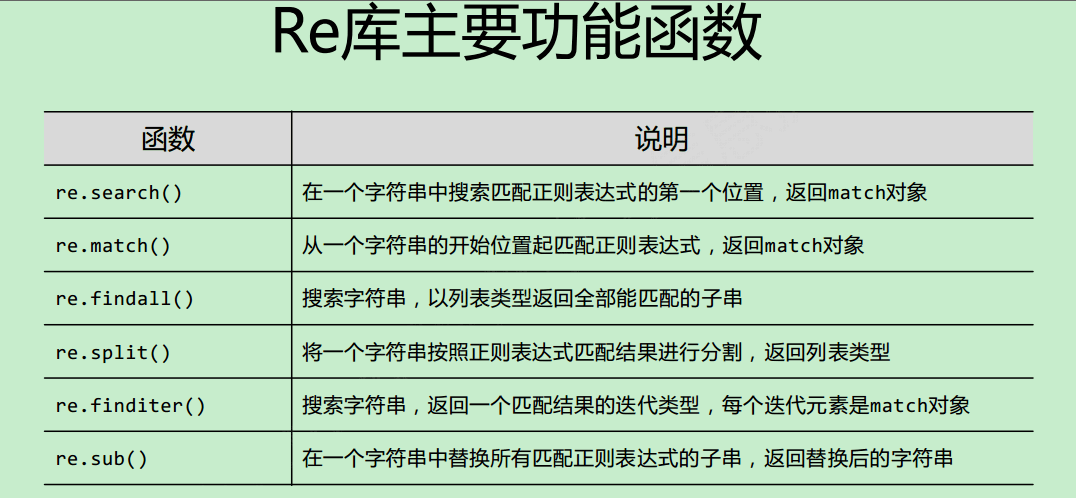
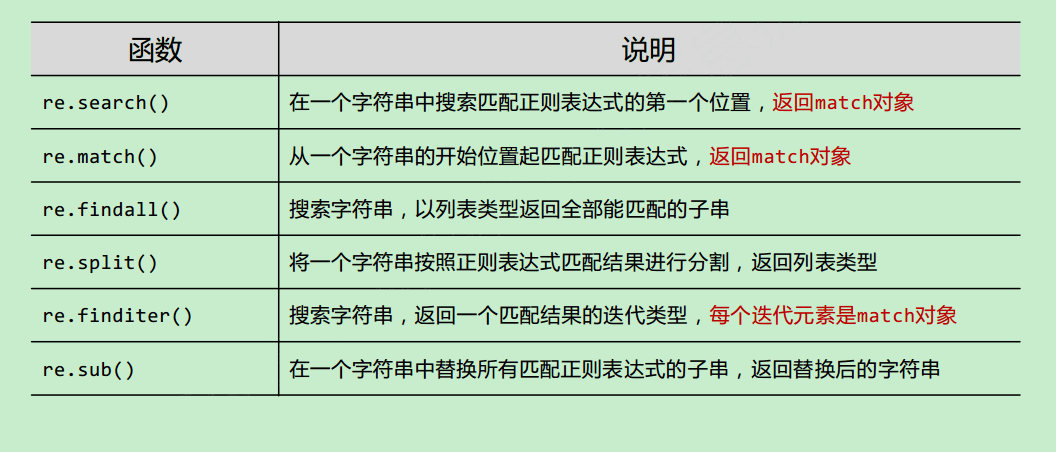
re库 re库采用raw string类型表示正则表达式,表示为:
re.search(pattern, string, flags=0)
re.match(pattern, string, flags=0)
re.findall(pattern, string, flags=0)
re.split(pattern, string, maxsplit=0, flags=0)
re.finditer(pattern, string, flags=0)
re.sub(pattern, repl, string, count=0, flags=0)
re库的另一种等价用法
regex = re.compile(pattern, flags=0)
∙ pattern : 正则表达式的字符串或原生字符串表示
1 2 3 4 5 6 7 8 9 10 11 12 13 14 15 16 17 18 19 20 21 22 23 24 25 26 27 28 29 30 31 32 33 34 35 36 37 38 39 40 41 42 43 44 45 46 47 48 49 50 51 52 53 54 55 56 57 58 59 60 61 62 63 64 65 66 67 68 69 70 71 72 73 74 75 76 77 78 79 80 81 82 83 84 85 86 87 88 89 90 91 92 93 94 95 96 97 98 99 100 101 102 103 104 105 106 107 108 109 110 111 112 113 114 >>> import re >>> text='alpha.beta...gamma delta' >>> re.split('[\. ]+' ,text) ['alpha' , 'beta' , 'gamma' , 'delta' ] >>> re.split('[\. ]+' ,text,maxsplit=2 ) ['alpha' , 'beta' , 'gamma delta' ] >>> re.split('[\. ]+' ,text,maxsplit=1 ) ['alpha' , 'beta...gamma delta' ] >>> >>> >>> >>> pat='[a-zA-Z]+' >>> re.findall(pat,text) ['alpha' , 'beta' , 'gamma' , 'delta' ] >>> pat='{name}' >>> text='Dear {name}...' >>> re.sub(pat,'Mr.Dong' ,text) 'Dear Mr.Dong...' >>> s='a s d' >>> re.sub('a|s|d' ,'good' ,s) 'good good good' >>> s="it's a very good good idea" >>> re.sub(r'(\b\w+) \1' ,r'\1' ,s) "it's a very good idea" >>> re.sub('a' ,lambda x:x.group(0 ).upper(),'aaa abc abde' ) 'AAA Abc Abde' >>> re.sub('[a-zA-Z]' ,lambda x:chr(ord(x.group(0 ))^32 ),'aaa aBc abde' ) 'AAA AbC ABDE' >>> >>> re.sub('a' ,'dfg' ,'aaa abc abde' ) 'dfgdfgdfg dfgbc dfgbde' >>> re.sub('a' ,'dfg' ,'aaa abc abde' ) 'dfgdfgdfg dfgbc dfgbde' >>> >>> >>> re.escape('http://www.python.org' ) 'http://www\\.python\\.org' >>> print(re.match('done|quit' ,'done' )) <re.Match object; span=(0 , 4 ), match='done' > >>> print(re.match('done|quit' ,'doe!' )) None >>> print(re.search('done|quit' ,'d!one!done' )) <re.Match object; span=(6 , 10 ), match='done' > >>> >>> s='aaa bb c d e fff ' >>> ' ' .join(s.split()) 'aaa bb c d e fff' >>> '' .join(s.split()) 'aaabbcdefff' >>> >>> ' ' .join(re.split('[\s]+' ,s.strip())) 'aaa bb c d e fff' >>> ' ' .join(re.split('\s' ,s.strip())) 'aaa bb c d e fff' >>> ' ' .join(re.split('\s+' ,s.strip())) 'aaa bb c d e fff' >>> re.sub('\s+' ,' ' ,s.strip()) 'aaa bb c d e fff'
使用正则表达式对象处理字符串 也就是编译后的正则表达式
match() search() findall()
正则表达式对象 match()方法再字符串开头或指定位置进行搜索,模式必须出现在字符串开头或指定位置
1 2 3 4 5 6 7 8 9 10 11 12 13 14 15 16 17 18 19 20 21 22 23 24 25 26 27 28 29 30 31 32 33 34 35 36 37 38 39 40 41 42 43 44 45 46 47 48 49 50 51 >>> import re>>> example='ShanDong Institute of Business and Technology' >>> pattern=re.compile(r'\bB\w+\b' )>>> pattern.findall(example)['Business' ] >>> >>> pattern=re.compile(r'\w+g\b' )>>> pattenr.findall(example)Traceback (most recent call last): File "<pyshell#18>" , line 1 , in <module> pattenr.findall(example) NameError: name 'pattenr' is not defined >>> pattern.findall(example)['ShanDong' ] >>> >>> pattern=re.compile(r'\b[a-zA-Z]{3}\b' )>>> pattern.findall(example)['and' ] >>> pattern=re.compile(r'\b[a-zA-Z]{3}' )>>> pattern.findall(example)['Sha' , 'Ins' , 'Bus' , 'and' , 'Tec' ] >>> example='andand okd ooooo' >>> pattern.findall(example)['and' , 'okd' , 'ooo' ] >>> pattern=re.compile(r'\b[a-zA-Z]{3}\b' )>>> pattern.findall(example)['okd' ] >>> >>> >>> example='ShanDong Institute of Business and Technology' >>> pattern.match(example)>>> pattern.search(example)<re.Match object; span=(31 , 34 ), match='and' > >>> pattern.re.compile(r'\b\w*a\w*\b' )Traceback (most recent call last): File "<pyshell#34>" , line 1 , in <module> pattern.re.compile(r'\b\w*a\w*\b' ) AttributeError: 're.Pattern' object has no attribute 're' >>> pattern=re.compile(r'\b\w*a\w*\b' )>>> pattern.findall(example)['ShanDong' , 'and' ] >>> >>> text='He was carefully disguised but captured quickly by police' >>> re.findall(r'\w+ly SyntaxError: EOL while scanning string literal >>> re.findall(r' \w+ly',text)#以ly结尾的单词 [' carefully', ' quickly'] >>>
sub() subn()
实现字符串替换功能
1 2 3 4 5 6 7 8 9 10 11 12 13 14 15 16 17 18 19 20 21 22 23 24 25 26 27 28 29 30 31 32 33 34 35 36 37 38 39 40 41 42 43 44 45 46 47 48 49 50 51 52 53 54 55 56 57 58 59 60 >>> eample='''Beautiful is better than ugly. Explicit is better than implicit. Simple is better than complex. Complex is better than complicated. Flat is better than nested. Sparse is better than dense. Readability counts.''' >>> pattern=re.compile(r'\bb\w*\b' ,re.I) >>> print(pattern.sub('*' ,example)) ShanDong Institute of * and Technology >>> print(pattern.sub('*' ,eample)) * is * than ugly. Explicit is * than implicit. Simple is * than complex. Complex is * than complicated. Flat is * than nested. Sparse is * than dense. Readability counts. >>> >>> print(pattern.sub(lambda x:x.group(0 ).upper(),eample)) BEAUTIFUL is BETTER than ugly. Explicit is BETTER than implicit. Simple is BETTER than complex. Complex is BETTER than complicated. Flat is BETTER than nested. Sparse is BETTER than dense. Readability counts. >>> print(pattern.sub('*' ,eample,1 )) * is better than ugly. Explicit is better than implicit. Simple is better than complex. Complex is better than complicated. Flat is better than nested. Sparse is better than dense. Readability counts. >>> >>> pattern=re.compile(r'\bb\w*\b' ) >>> print(pattern.sub('*' ,example,1 )) ShanDong Institute of Business and Technology >>> print(pattern.sub('*' ,eample,1 )) Beautiful is * than ugly. Explicit is better than implicit. Simple is better than complex. Complex is better than complicated. Flat is better than nested. Sparse is better than dense. Readability counts. >>>
split()
字符串分隔
1 2 3 4 5 6 7 8 9 10 11 12 13 14 15 16 17 18 19 20 21 22 23 24 25 26 27 >>> example=r'one,two,three,four/five\six?seven[eight]nine|ten' >>> pattern=re.compile(r'[,./\\?[]\|]' ) >>> pattern.split(example) ['one,two,three,four/five\\six?seven[eight]nine|ten' ] >>> pattern=re.compile(r'[,./\\?[]\|]' ) >>> pattern.split(example) ['one,two,three,four/five\\six?seven[eight]nine|ten' ] >>> >>> >>> >>> example=r'one1two2three3four4five5ten' >>> pattern=re.compile(r'\d+' ) >>> pattern.split(example) ['one' , 'two' , 'three' , 'four' , 'five' , 'ten' ] >>>
match对象 正在表达式对象的match()方法和search()方法匹配成功后都会返回match对象。
group() 返回匹配的一个或多个子模式内容
1 2 3 4 5 6 7 8 9 10 11 12 13 14 15 16 17 18 19 20 21 22 23 24 25 26 >>> m=re.match(r'(\w+) (\w+)' ,'Isaac Newton,physicist' ) >>> m.group(0 ) 'Isaac Newton' >>> m.group(1 ) 'Isaac' >>> m.goup(2 ) Traceback (most recent call last): File "<pyshell#82>" , line 1 , in <module> m.goup(2 ) AttributeError: 're.Match' object has no attribute 'goup' >>> m.group(2 ) 'Newton' >>> m.group(3 ) Traceback (most recent call last): File "<pyshell#84>" , line 1 , in <module> m.group(3 ) IndexError: no such group >>> m.group(1 ,2 ) ('Isaac' , 'Newton' )
子模式扩展语法 1 2 3 4 5 6 7 8 9 10 11 12 13 14 15 16 17 18 19 20 21 22 23 24 25 26 27 28 29 30 31 32 33 34 35 36 37 38 39 40 41 42 43 44 45 46 47 48 49 50 51 52 53 54 55 >>> m=re.match(r'(?P<first_name>\w+) (?P<last_name>\w+)' ,'Malcolm Reynolds' ) >>> m.group('first_name' ) 'Malcolm' >>> m.group('last_name' ) 'Reynolds' >>> m=re.match(r'(\d+)\.(\d+)' ,'24.1632' ) >>> m.groups() ('24' , '1632' ) >>> >>> >>> m=re.match(r'(?P<first_name>\w+) (?P<last_name>\w+)' ,'Malcolm Reynolds' ) >>> m.groupdict() {'first_name' : 'Malcolm' , 'last_name' : 'Reynolds' } >>> pattern=re.compile(r'(?<=\w\s)never(?=\s\w)' ) >>> exampleString='''There should be one-- and preferably only one --obvious way to do it. Although that way may not be obvious at first unless you're Dutch. Now is better than never. Although never is often better than *right* now.''' >>> matchResult=pattern.search(exampleString) >>> matchResult.span() (172 , 177 ) >>> pattern=re.compile(r'(?:is\s)better(\sthan)' ) >>> matchResult=pattern.search(exampleString) >>> matchResult.span() (141 , 155 ) >>> matchResult.group(0 ) 'is better than' >>> matchResult.group(1 ) ' than' >>>
正则表达式扩展语法
使用()表示一个子模式,圆括号里的内容作为一个整体看待
语法
功能
(?P<groupname>)
为子模式命名
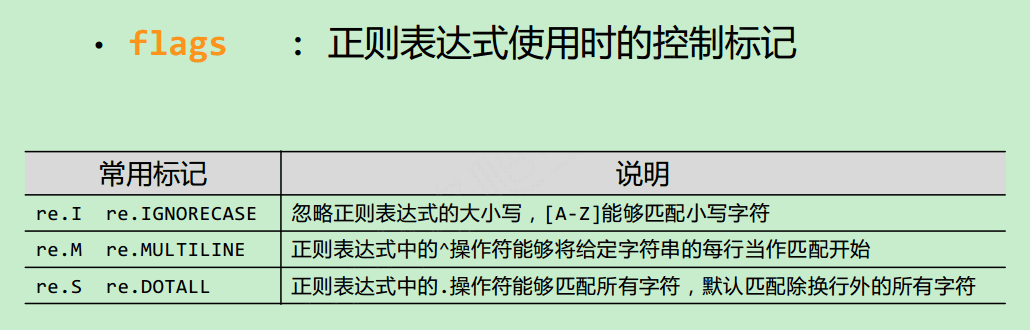
(?iLmsux)
设置匹配标志
(?:…)
匹配但是不捕获改匹配的子表达式
(?P=groupname)
表示在此之前命名为goupname的子模式
(?#…)
表示注释
(?<=…)
用于正则表达式之前,如果<=后的内容在字符串中出现则匹配,但不返回<=之后的内容
(?=…)
用于正则表达式之后,如果=后的内容在字符串中出现则匹配,但不返<=之后的内容
(?<! …)
用于正则表达式之前,如果<!后的内容在字符串中不出现则匹配,但不返回<!之后的内容
(?!…)
用于正则表达式之后,如果!后的内容在字符串中出现则匹配,但不返回!之后的内容
文件内容操作 内置函数 open() open(file,mode='r',buffering=-1,encoding=None,errors=None,newline=None,closefd=True,opener=None)
各参数说明:
file:要打开的文件
mode: 打开文件后的处理方式,以不同方式打开文件时,文件指针初始位置略有不同。 以只读和只写模式打开时文件指针的初始位置是文件头,以 追加 模式打开时文件指针的初始位置为文件尾。
文件的打开模式有七个:
buffering指定读写文件的缓存模式,数值0(只在二进制模式中可用)表示不缓存,数值1(只在文本模式中可用)表示使用行缓存模式,大于1的数字则表示缓冲区的大小,默认值是-1. 当使用默认值-1时,二进制文件和非交互式文本文件以固定大小的块为缓存单位,等价于io.DEFAULT_BUFFER_SIZE,交互式文本文件(isatty()方法返回True)采用行缓存模式。 缓存机制使得修改文件时不需要频繁的进行磁盘文件的读写操作,而是等缓存满了后再写入文件,或者在需要的时候调用 flush() 方法将缓存中的内容写入磁盘文件。。
在关闭文件前发生了错误导致程序崩溃,这时文件就无法正常关闭。。。
注意 :open()函数返回的是一个可迭代的文件对象,通过该文件对象可以对文件进行读写。。。
文件对象常用方法:
with关键字 为了更安全的关闭文件,涉及上下文
1 2 with open(filename,mode,encoding) as file: #这里写通过文件对象file读写文件内容的语句。。
文件与文件夹操作 遍历,复制,删除,压缩,重命名等
os模块 使用操作系统功能
os.path模块 shutil模块 glob 模块 fnmatch 模块 参考资料 编码 http://www.michealpan.xyz/2018/04/28/python%E4%B8%8E%E5%85%B6%E7%BC%96%E7%A0%81/
http://www.fmddlmyy.cn/text6.html
http://cenalulu.github.io/linux/character-encoding/
http://www.ruanyifeng.com/blog/2007/10/ascii_unicode_and_utf-8.html
https://zh.wikipedia.org/wiki/%E5%AD%97%E7%AC%A6%E7%BC%96%E7%A0%81
http://guochenglai.com/2016/06/03/coding-history/
https://www.liaoxuefeng.com/wiki/0014316089557264a6b348958f449949df42a6d3a2e542c000/001431664106267f12e9bef7ee14cf6a8776a479bdec9b9000
https://blog.csdn.net/baixiaoshi/article/details/40786503
https://blog.csdn.net/Gavin_new/article/details/52863297
https://www.zhihu.com/question/20650946
The Zen of Python, by Tim Peters The Zen of Python, by Tim Peters
Beautiful is better than ugly.right now.